Barcode inventory management works by giving every product, or every product variant, a unique barcode, then using a scanner and point-of-sale software to record each sale, purchase, and stock movement against that code automatically. For a small retail store in India, this usually means printing barcode labels in-house, scanning stock in and out through billing software such as RichPOS, and letting the system update quantities, trigger low-stock alerts, and feed GST-ready reports without anyone counting shelves by hand.
Key Takeaways
Barcode scanning removes the two biggest sources of stock-count errors: mistyped SKUs in a spreadsheet and sales that never get recorded.
A working setup needs three things: a barcode or label printer, a USB or Bluetooth scanner, and POS software that tracks stock at the SKU level.
Low-stock alerts and reorder points only help if every sale and purchase is actually scanned, not entered from memory at closing time.
Each product variant, size, color, or pack weight, needs its own barcode; one code shared across a product line makes variant-level stock reporting impossible.
RichPOS combines barcode generation, label printing, stock adjustments, and GST billing in one system, so store owners are not reconciling inventory data across three separate tools.
Why Spreadsheets and Manual Counting Break Down as a Store Grows
A spreadsheet or a physical stock register works fine for a shop with fifty SKUs and one billing counter. It stops working the moment a store adds a second counter, a second location, or a few hundred more items, because the sheet only reflects what a staff member remembers to type after a sale, not what actually left the shelf.
This gap shows up in three places most often. Fast-moving SKUs run out without warning because nobody flagged them as low. Slow-moving stock quietly expires or goes obsolete because nobody is tracking aging by batch. And GST filing turns into a reconciliation exercise, because sales recorded in a notebook rarely match the HSN-wise summary a return needs. Five signs a store has outgrown spreadsheets covers the specific symptoms owners tend to notice first, like recurring stock mismatches during audits or staff spending hours reconciling day-end totals.
[IMAGE: A small Indian retail shop counter with shelves of packaged goods, a barcode scanner, and a receipt printer - search terms: retail shop barcode scanner India, small store inventory shelf]
How Barcode-Based Inventory Management Actually Works
The core idea is simple: instead of a person typing a product name and quantity, a scanner reads a code and the software looks up the exact item. Every barcode maps to one SKU record in the system, which stores its price, tax rate, current stock quantity, and reorder point.
Three events move stock in a barcode system, and each one should involve a scan rather than a manual entry:
Goods receipt: new stock arrives from a supplier, gets scanned in, and the on-hand quantity increases.
Sale at billing: a customer's items are scanned at checkout, and the on-hand quantity decreases at the same moment the invoice is generated.
Stock adjustment or transfer: damaged goods, internal use, or transfers between counters or branches are scanned and logged with a reason code, so the quantity change is traceable later.
Because each of these updates the same central record, the stock count shown on screen matches what should physically be on the shelf, as long as scanning happens consistently at every step.
Setting Up Barcode Inventory in a Retail Store
Getting started does not require an enterprise warehouse system. Most small stores in India can set up a working barcode process with a label printer, a scanner, and POS software configured correctly for their product catalog.
Printing Barcode Labels for New Stock
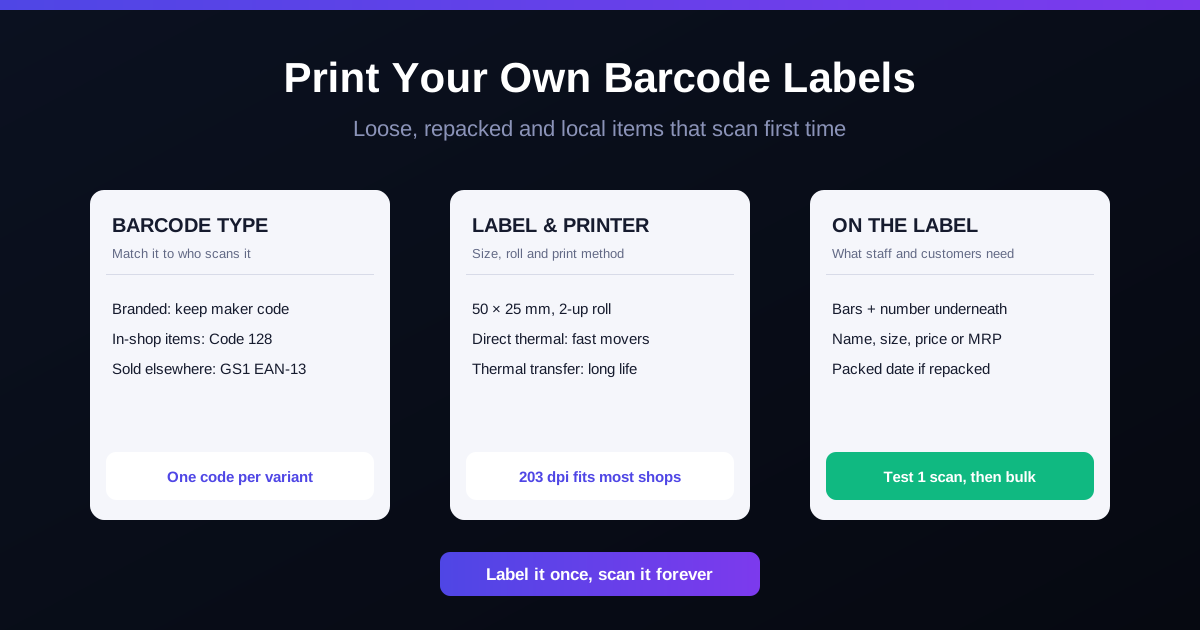
Products that already arrive with a manufacturer barcode (most branded FMCG and electronics items) do not need a new label. For loose items, in-house repacks, or products sold under a private label, the store generates its own barcode in the POS software and prints it on a label, either through a dedicated thermal barcode printer or on adhesive sheets through a regular printer for lower volumes. The label should carry the barcode, the product name, and the selling price, so staff can visually confirm the item even before scanning.
Recording Stock Adjustments and Stock Transfers
Stock adjustments cover anything that changes quantity outside a normal sale or purchase: damaged units written off, stock used for a promotional giveaway, or a recount correction after a physical audit. Recording these against the same SKU code, with a short reason attached, keeps the audit trail intact. Without this step, any discrepancy from theft, damage, or counting error gets silently absorbed into the "missing stock" bucket with no way to trace when or why it happened.
Managing Product Variants Like Size, Color, and Weight
A shirt that comes in small, medium, and large is not one inventory item; it is three, and each size needs its own barcode and its own stock count. The same applies to color variants, flavors, or different pack sizes of the same product. Treating variants as a single SKU might simplify the initial catalog setup, but it makes it impossible to know that the store is out of "large" while still holding twenty units of "small," which is exactly the kind of stockout that drives customers to a competitor.
Setting Low-Stock Alerts and Reorder Points
A low-stock alert is only useful if it is tied to a number that reflects how fast an item actually sells, not a flat threshold applied to the whole catalog. A fast-moving SKU that sells 20 units a day needs a much higher reorder point than a slow-moving item that sells two a week, even if both currently show ten units on hand.
Setting this up in a barcode-based POS system involves defining, per SKU, a minimum stock level that triggers an alert and, where possible, a suggested reorder quantity based on past sales velocity. Because every sale is already being scanned and logged, the software has the sales history needed to flag these thresholds automatically, rather than an owner guessing from memory or a monthly stock report that arrives too late to act on.
How RichPOS Handles Barcode Inventory for Small Retailers
RichPOS brings barcode generation, label printing, stock adjustments, and billing into a single workflow, so a sale recorded at the counter is the same event that updates stock and feeds the GST return, rather than three separate manual steps that need reconciling later. Products can carry manufacturer barcodes or be assigned in-house codes generated and printed directly from the software, and each variant of a product is tracked as its own SKU with its own stock count and reorder point.
At billing, scanning an item through RichPOS billing and POS pulls the correct price and tax rate automatically and reduces stock in real time, which removes the lag between a sale happening and the system knowing about it. Stock adjustments, transfers between counters, and goods receipt are logged the same way, each tied back to the SKU and timestamped for later review. Because tax rates and HSN codes are attached at the product level, the same scan that closes a sale also produces the data needed for GST reporting, instead of a separate reconciliation exercise at month-end.
Getting Started
Barcode inventory management fixes the core problem with spreadsheets and manual counts: the gap between what the register says is in stock and what is physically on the shelf. The fix does not require a warehouse-grade system, just consistent scanning at goods receipt, at billing, and at every adjustment, backed by software that treats each variant as its own trackable SKU. Store owners evaluating a move away from manual tracking can start by reviewing how RichPOS handles billing and stock together and mapping their current catalog into SKU-level barcodes before the next stock-take.
FAQ
Frequently asked questions
Do I need to buy a separate barcode printer to start?
Not necessarily. Stores with a small number of unbranded or repackaged items can print barcode labels on adhesive sheets using a standard printer, which is enough for low label volumes. A dedicated thermal barcode printer becomes worth the cost once a store is generating labels for dozens of new SKUs or variants every week, since it prints faster and the labels hold up better to handling.
What happens if a product does not have a manufacturer barcode?
The store generates its own barcode inside the POS software and assigns it to that SKU, then prints and applies the label before the item goes on the shelf. This is the standard approach for loose goods, repacked items, and private-label products across Indian retail.
How do barcodes help with GST filing specifically?
Every barcode is linked to a SKU that carries its HSN code and applicable tax rate. When that item is scanned at billing, the invoice is generated with the correct tax details automatically, which means the sales data used for GST returns is accurate at the point of sale rather than reconstructed later from paper records.
Can barcode inventory management work across multiple store branches?
Yes, as long as the POS software supports centralized stock visibility. Each branch scans its own sales and stock movements, but a system built for multi-location retail consolidates that data so an owner can see stock levels across all branches and transfer inventory between them without a separate spreadsheet.
Founder, RichPOS Software, Ahmedabad. We build RichPOS for Indian shops and write these guides from what shop owners ask us every day. Facts on tax rates and prices are dated; confirm GST matters with your CA. Questions? WhatsApp us.
Make GST bills in seconds with RichPOS
Billing, stock, WhatsApp bills and GST reports in one app. Free 30-day trial with no card, then ₹99/month for 3 months and ₹199/month after.
Inventory Management for Retail Shops in IndiaRetail inventory management in India, 2026: turnover ratio, reorder point, safety stock and dead-stock formulas, with rupee examples and a weekly routine.
Expiry Date Management for Retail Shops: FEFO GuideHow Indian grocery, pharmacy and FMCG shops can cut expiry losses: FEFO vs FIFO, batch tracking, a near-expiry report, returns, and GST on written-off stock.
Purchase Order Management for Retail Shops in IndiaA practical guide to purchase orders for Indian retail shops: raising POs, partial receiving, supplier dues and claiming GST input tax credit without errors.
How to Print Barcode Labels for Your Retail ShopHow to print barcode labels in your shop: EAN-13 vs Code 128, label sizes, thermal printers, what to print on each label and mistakes that stop scans.
30 din FREE · Billing appthen ₹99/month for 3 monthsTry free