Multi-Store & Multi-Warehouse
Run every branch and warehouse from one login. Assign staff to specific locations, see consolidated or per-store reports, and keep stock levels accurate across every location you operate.
Intro offerRegular price ₹199₹99/monthfirst 3 months · then ₹199
After the free 30-day trial · or ₹1,999/year · Billing, stock & GST included
RichPOS at a glance
Updated
| What it is | RichPOS: GST billing and point-of-sale (POS) software for shops in India |
|---|---|
| Best for | Multi-Store & Multi-Warehouse: Run every branch and warehouse from one login. Assign staff to specific locations, see consolidated or per-store reports, and keep stock levels accurate across every location you operate. |
| Not the right pick if | You need offline billing, GST e-invoices (IRN), e-way bills or a weighing scale connected directly to the computer. RichPOS does not do these (it does read the barcode labels printed by label-printing weighing scales). |
| Price | Free 30-day trial, then Dukaan ₹99/month for the first 3 months, ₹199/month after, or ₹1,999/year (about ₹5.50 a day). Bigger plans: Dukaan Plus ₹399, Business ₹599, Business Pro ₹899 a month. Every plan has billing, stock, udhaar, GST reports, WhatsApp bill sharing and unlimited devices; staff users: 2 on Dukaan, 5 on Dukaan Plus, unlimited on Business and Business Pro (the owner login is not counted). No GST, no setup fee. |
| Free trial | 30 days, no card needed. Up to 200 items & customers, 500 invoices, 1 warehouse and 1 user. |
| Runs on | One web app in any modern browser on a PC, laptop, tablet or phone (iPhone and iPad too), free Windows, Mac and Linux desktop apps, and an Android app. Prints on 58/80 mm thermal and A4 printers. |
| GST | GST bills with HSN codes and CGST/SGST/IGST split, GSTR-1-ready reports, Tally export. Does not generate e-invoices (IRN) or e-way bills. |
| Internet | Needed, also in the desktop apps. There is no offline mode. |
| Backups | RichPOS backs up all shop data daily on its servers. Export your reports to Excel, CSV or PDF anytime. |
| If your plan ends | If your plan ends, your data stays in your account. You can still log in to view it and export it to Excel/CSV. |
| Made by | RichPOS Software, Ahmedabad, Gujarat, India. Support in English and Hindi on WhatsApp +91 90333 31255. |
Multi-Store & Multi-Warehouse in RichPOS
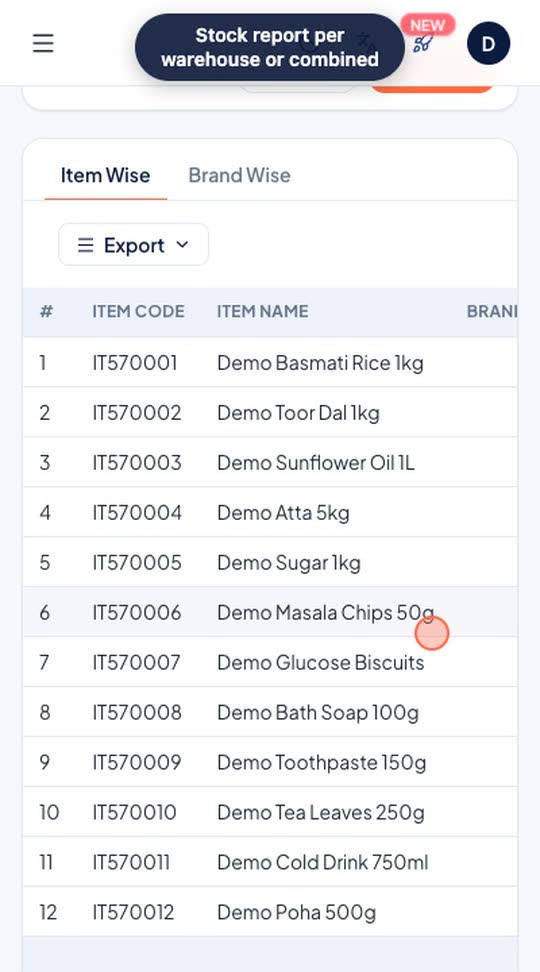
Add another branch or godown as a warehouse, transfer stock from the shop to it, and see the stock report for one warehouse or all of them together.
Who it's for: Shops with a godown, a second branch or a separate store room.
- Warehouse > Add Warehouse
- Stock > Transfer: from, to, items, quantity
- Reports > Stock, filtered by warehouse
Real screen recording of the RichPOS web app on a phone-size screen, with a demo store and demo data. No sound.
How it works
Growing from one shop to three shouldn't mean juggling three separate systems. RichPOS runs every branch and warehouse from a single login, so an owner sees the whole business at a glance while each location carries on with its own day-to-day billing.
Staff are assigned to the locations they actually work at, reports can be pulled per store or consolidated across all of them, and stock stays accurate everywhere at once. You keep central control; your managers keep local autonomy — no data silos, no end-of-day phone calls to reconcile figures.
What you get
- Locations by plan: 2 on Dukaan Plus, 3 on Business, unlimited on Business Pro (Dukaan has 1)
- Per-location staff assignment and permissions
- Consolidated and per-store sales & stock reports
- Central control with local-level day-to-day operation
Trial: Up to 200 items & customers, 500 invoices, 1 warehouse and 1 user.
Shops that use Multi-Store & Multi-Warehouse
Retail chains with two or more branches
Businesses separating shop-floor and warehouse stock
Franchise owners tracking each outlet's performance
Owners who want one dashboard for the whole business
See RichPOS for clothing & garment shops, mobile & electronics shops, mobile repair shops, kirana & grocery stores, footwear & shoe shops, cosmetics & beauty stores, stationery & gift shops, medical stores & chemists and hardware & sanitary shops.
Multi-Store & Multi-Warehouse questions
How does Multi-Store & Multi-Warehouse work in RichPOS?
Add another branch or godown as a warehouse, transfer stock from the shop to it, and see the stock report for one warehouse or all of them together. Steps: 1) Warehouse > Add Warehouse; 2) Stock > Transfer: from, to, items, quantity; 3) Reports > Stock, filtered by warehouse.
Can I manage multiple stores from one account?
Yes, on Dukaan Plus and above. RichPOS runs your stores and warehouses from a single login, with staff assigned to specific locations: 2 locations on Dukaan Plus, 3 on Business and unlimited on Business Pro. The Dukaan plan has 1 location.
Can I see reports per store and across all stores?
Yes. You get both consolidated and per-store sales and stock reports from the same account.
Does each branch keep local control?
Yes. Day-to-day operations run at the branch level while owners keep central control and visibility across every location.
More in RichPOS
Accounts & Cash
Cash transactions, money transfers, deposits and full accounts ledger.
Learn moreGST & 20+ Reports
Profit & loss, sales/purchase GST reports, stock, expense and tax reports, ready to export.
Learn moreSMS, Email & WhatsApp
Send bills on WhatsApp, SMS or email, and one-click WhatsApp payment reminders.
Learn moreBilling software with unlimited users and multiple stores: what does it really cost?
Per-user, per-location or flat price? What billing software costs for 3 counters and 2 shops in India, from vendor pricing pages checked 22 Oct 2026.
Read the answerKeep reading
Guides and a free tool related to Multi-Store & Multi-Warehouse:
Try Multi-Store & Multi-Warehouse free for 30 days
No card needed. Billing, stock, udhaar and GST reports included.