Billing & POS software for Indian shops
RichPOS Billing & POS is the checkout counter of RichPOS: scan or search an item, take cash, card, UPI or a split payment, and print the bill on a 58/80 mm thermal or A4 printer or send it on WhatsApp.
A checkout counter built for speed: barcode scanning, quick product search, split payments and instant printed or emailed receipts. Turn quotations into invoices in one click and process sales returns without breaking your stock records.
Intro offerRegular price ₹199₹99/monthfirst 3 months · then ₹199
After the free 30-day trial · or ₹1,999/year · Billing, stock & GST included
RichPOS at a glance
Updated
| What it is | RichPOS: GST billing and point-of-sale (POS) software for shops in India |
|---|---|
| Best for | Billing & POS: A checkout counter built for speed: barcode scanning, quick product search, split payments and instant printed or emailed receipts. Turn quotations into invoices in one click and process sales returns without breaking your stock records. |
| Not the right pick if | You need offline billing, GST e-invoices (IRN), e-way bills or a weighing scale connected directly to the computer. RichPOS does not do these (it does read the barcode labels printed by label-printing weighing scales). |
| Price | Free 30-day trial, then Dukaan ₹99/month for the first 3 months, ₹199/month after, or ₹1,999/year (about ₹5.50 a day). Bigger plans: Dukaan Plus ₹399, Business ₹599, Business Pro ₹899 a month. Every plan has billing, stock, udhaar, GST reports, WhatsApp bill sharing and unlimited devices; staff users: 2 on Dukaan, 5 on Dukaan Plus, unlimited on Business and Business Pro (the owner login is not counted). No GST, no setup fee. |
| Free trial | 30 days, no card needed. Up to 200 items & customers, 500 invoices, 1 warehouse and 1 user. |
| Runs on | One web app in any modern browser on a PC, laptop, tablet or phone (iPhone and iPad too), free Windows, Mac and Linux desktop apps, and an Android app. Prints on 58/80 mm thermal and A4 printers. |
| GST | GST bills with HSN codes and CGST/SGST/IGST split, GSTR-1-ready reports, Tally export. Does not generate e-invoices (IRN) or e-way bills. |
| Internet | Needed, also in the desktop apps. There is no offline mode. |
| Backups | RichPOS backs up all shop data daily on its servers. Export your reports to Excel, CSV or PDF anytime. |
| If your plan ends | If your plan ends, your data stays in your account. You can still log in to view it and export it to Excel/CSV. |
| Made by | RichPOS Software, Ahmedabad, Gujarat, India. Support in English and Hindi on WhatsApp +91 90333 31255. |
Billing & POS in RichPOS
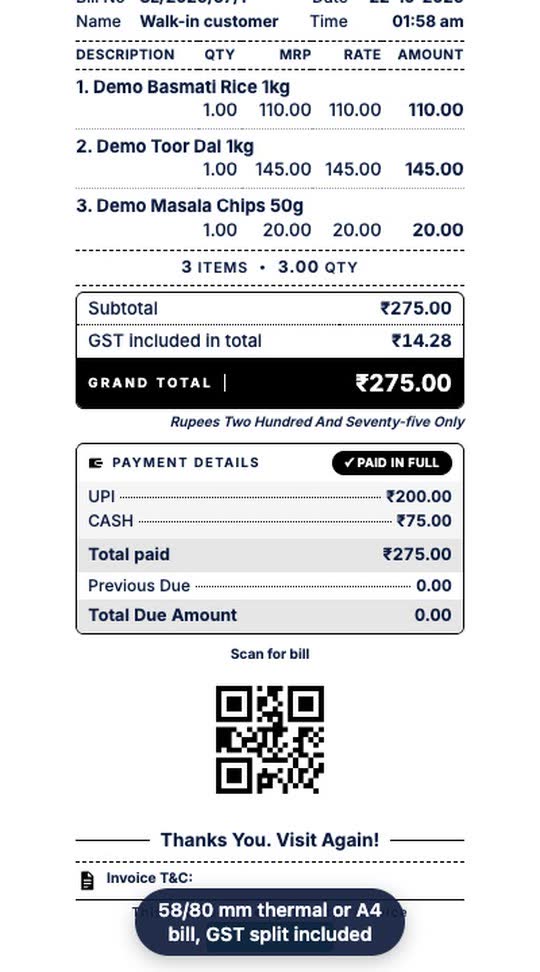
Scan a barcode and the item lands on the bill. Take part of the payment by UPI and the rest in cash, then save and print a GST bill on a 58/80 mm thermal or A4 printer.
Who it's for: Any shop that bills at a counter: kirana, clothing, footwear, mobile and medical stores.
- Scan or type the item
- Tap Multiple and enter the UPI and cash amounts
- Tap Save & Print
Real screen recording of the RichPOS web app on a phone-size screen, with a demo store and demo data. No sound.
How it works
Every second at the counter counts. RichPOS Billing & POS is built so a cashier can find a product, add it to the bill and take payment in a handful of keystrokes — no mouse hunting, no waiting. Scan a barcode or type the first few letters of a product name and it lands on the invoice instantly, even during a queue at peak hour.
Beyond the sale itself, the module keeps your paperwork honest. Quotations convert into invoices with a single click, sales returns automatically write back both stock and ledger entries, and every bill can be printed on a thermal or A4 printer or sent by email and WhatsApp. Cash, card, UPI and split payments are all first-class, so a ₹4,999 bill can be settled part-UPI, part-cash with no workaround.
More on this: barcode billing with label sheets and box barcodes.
What you get
- Barcode & keyboard-driven checkout for fast billing
- Quotations that convert directly into invoices
- Sales returns with automatic stock and ledger correction
- Cash, card, UPI and split-payment support on every bill
- Thermal (58 mm / 80 mm) and A4 bill printing
- Automatic invoice numbering, with a separate invoice prefix for each store
- Automatic offers at billing, such as bill % off and buy X get Y
- Customer GSTIN printed on the bill when it is saved on the customer, with B2B and B2C split in the GSTR-1 report
- HSN code and GST rate saved on each item and applied on every bill, with an HSN column on A4 GST invoices
Trial: Up to 200 items & customers, 500 invoices, 1 warehouse and 1 user.
Shops that use Billing & POS
Retail shops with a busy front counter
Supermarkets and grocery stores needing fast barcode billing
Businesses that quote first and invoice later
Shops accepting UPI, card and cash on the same bill
See RichPOS for clothing & garment shops, mobile & electronics shops, mobile repair shops, kirana & grocery stores, footwear & shoe shops, cosmetics & beauty stores, stationery & gift shops, medical stores & chemists and hardware & sanitary shops.
More you can do here
Hold bills
Put a bill on hold at POS (Alt+H) to serve the next customer, then open it again from the Hold List.
Quotations
Make a quotation and turn it into a bill later (Quotation menu).
Sales returns
Return items against a bill; stock and the customer's balance are corrected.
POS bill design
Settings > POS Invoice Design: choose what the thermal bill shows, such as logo, GST number and a QR code.
Billing & POS questions
How does Billing & POS work in RichPOS?
Scan a barcode and the item lands on the bill. Take part of the payment by UPI and the rest in cash, then save and print a GST bill on a 58/80 mm thermal or A4 printer. Steps: 1) Scan or type the item; 2) Tap Multiple and enter the UPI and cash amounts; 3) Tap Save & Print.
What is RichPOS Billing & POS?
RichPOS Billing & POS is a checkout system with barcode scanning, quick product search, split payments and instant printed or emailed receipts. It also converts quotations into invoices in one click.
Does RichPOS support UPI, card and split payments?
Yes. Every bill accepts cash, card, UPI and split payments, so a single invoice can be settled across multiple payment methods.
Can I process sales returns without breaking stock records?
Yes. Sales returns automatically correct both stock levels and the accounts ledger, so returns never leave your inventory out of sync.
More in RichPOS
Inventory & Barcode
Items, categories, brands, variants, stock adjustments and barcode label printing.
Learn morePurchase & Suppliers
Purchase orders, supplier ledgers, purchase returns, stock transfers between warehouses.
Learn moreMulti-Store & Multi-Warehouse
Manage several branches and warehouses from a single account with role-based access.
Learn moreKeep reading
Guides and a free tool related to Billing & POS:
Try Billing & POS free for 30 days
No card needed. Billing, stock, udhaar and GST reports included.