Inventory & Barcode
Organize your entire catalog by category, brand and variant (size, color, unit), track stock adjustments with a full audit trail, and print barcode labels directly from the app for anything you stock.
Intro offerRegular price ₹199₹99/monthfirst 3 months · then ₹199
After the free 30-day trial · or ₹1,999/year · Billing, stock & GST included
RichPOS at a glance
Updated
| What it is | RichPOS: GST billing and point-of-sale (POS) software for shops in India |
|---|---|
| Best for | Inventory & Barcode: Organize your entire catalog by category, brand and variant (size, color, unit), track stock adjustments with a full audit trail, and print barcode labels directly from the app for anything you stock. |
| Not the right pick if | You need offline billing, GST e-invoices (IRN), e-way bills or a weighing scale connected directly to the computer. RichPOS does not do these (it does read the barcode labels printed by label-printing weighing scales). |
| Price | Free 30-day trial, then Dukaan ₹99/month for the first 3 months, ₹199/month after, or ₹1,999/year (about ₹5.50 a day). Bigger plans: Dukaan Plus ₹399, Business ₹599, Business Pro ₹899 a month. Every plan has billing, stock, udhaar, GST reports, WhatsApp bill sharing and unlimited devices; staff users: 2 on Dukaan, 5 on Dukaan Plus, unlimited on Business and Business Pro (the owner login is not counted). No GST, no setup fee. |
| Free trial | 30 days, no card needed. Up to 200 items & customers, 500 invoices, 1 warehouse and 1 user. |
| Runs on | One web app in any modern browser on a PC, laptop, tablet or phone (iPhone and iPad too), free Windows, Mac and Linux desktop apps, and an Android app. Prints on 58/80 mm thermal and A4 printers. |
| GST | GST bills with HSN codes and CGST/SGST/IGST split, GSTR-1-ready reports, Tally export. Does not generate e-invoices (IRN) or e-way bills. |
| Internet | Needed, also in the desktop apps. There is no offline mode. |
| Backups | RichPOS backs up all shop data daily on its servers. Export your reports to Excel, CSV or PDF anytime. |
| If your plan ends | If your plan ends, your data stays in your account. You can still log in to view it and export it to Excel/CSV. |
| Made by | RichPOS Software, Ahmedabad, Gujarat, India. Support in English and Hindi on WhatsApp +91 90333 31255. |
Inventory & Barcode in RichPOS
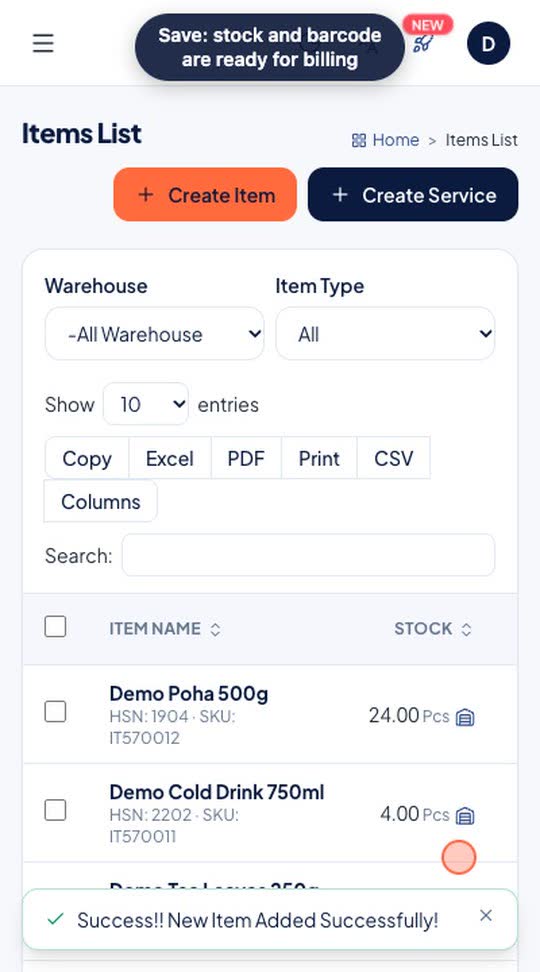
Add an item once with its category, HSN code, barcode, GST rate, price, MRP, low-stock alert and opening stock. It is ready to scan at the counter as soon as you save.
Who it's for: Shops setting up their catalogue or adding new stock.
- Items > Add Item
- Fill name, category, HSN, barcode, price, GST and opening stock
- Save
Real screen recording of the RichPOS web app on a phone-size screen, with a demo store and demo data. No sound.
How it works
A point-of-sale system is only as good as the stock data behind it. RichPOS lets you build your entire catalogue the way your shop actually works — grouped by category and brand, and split into variants for size, colour or unit — with no cap on how many items you add.
Every movement is accountable. Stock adjustments are logged with a reason and the user who made them, low-stock alerts warn you before a fast-moving item runs out, and you can design and bulk-print barcode labels straight from the app instead of paying for a separate labelling tool.
More on this: how barcode billing works, from scanner to label sheet.
What you get
- Categories, brands and variants; items up to 2,000 on Dukaan, 10,000 on Dukaan Plus, unlimited on Business
- Stock adjustment log with reason and user tracking
- Barcode label design and bulk printing
- Optional Finish and Size on each item (for example Chrome, 15 mm), shown in item search, on the bill, the invoice and barcode labels
- Item photo on barcode labels, and an Item image element in the Label Designer (thermal printers print the photo in black and white)
- Low-stock alerts so you never run out unexpectedly
Trial: Up to 200 items & customers, 500 invoices, 1 warehouse and 1 user.
Shops that use Inventory & Barcode
Apparel and footwear shops with size and colour variants
Grocery and general stores with large catalogues
Businesses that print their own barcode labels
Owners who want an audit trail on every stock change
See RichPOS for clothing & garment shops, mobile & electronics shops, mobile repair shops, kirana & grocery stores, footwear & shoe shops, cosmetics & beauty stores, stationery & gift shops, medical stores & chemists and hardware & sanitary shops.
More you can do here
Print barcode labels
Items > Print Labels, with a label designer for the label layout.
Import items
Import items and services from a CSV file saved from Excel, or import your data from Vyapar.
Stock adjustment
Correct stock with a reason; every adjustment is listed with who made it.
Variants
Size, colour or other variants of one item, each with its own barcode and stock.
Inventory & Barcode questions
How does Inventory & Barcode work in RichPOS?
Add an item once with its category, HSN code, barcode, GST rate, price, MRP, low-stock alert and opening stock. It is ready to scan at the counter as soon as you save. Steps: 1) Items > Add Item; 2) Fill name, category, HSN, barcode, price, GST and opening stock; 3) Save.
How does RichPOS organize inventory?
RichPOS organizes your catalog by category, brand and variant (size, colour, unit), with up to 2,000 items on Dukaan, 10,000 on Dukaan Plus and unlimited on Business and Business Pro, and tracks every stock adjustment with a full audit trail.
Can RichPOS print barcode labels?
Yes. You can design and bulk-print barcode labels directly from the app for anything you stock.
Does RichPOS warn about low stock?
Yes. Low-stock alerts notify you before an item runs out so you can reorder in time.
More in RichPOS
Purchase & Suppliers
Purchase orders, supplier ledgers, purchase returns, stock transfers between warehouses.
Learn moreMulti-Store & Multi-Warehouse
Manage several branches and warehouses from a single account with role-based access.
Learn moreAccounts & Cash
Cash transactions, money transfers, deposits and full accounts ledger.
Learn moreKeep reading
Guides and a free tool related to Inventory & Barcode:
Try Inventory & Barcode free for 30 days
No card needed. Billing, stock, udhaar and GST reports included.