On this page · 12 sections
- When is an e-way bill required?
- The ₹50,000 limit at a glance
- Who has to generate it?
- How to generate an e-way bill (step by step)
- After generating: change vehicle, cancel, reject
- Can RichPOS generate an e-way bill?
- Validity — how long an e-way bill lasts
- The 180-day rule (since 1 January 2025)
- Penalty for moving goods without an e-way bill
- When an e-way bill is NOT needed
- FAQ
- The bottom line
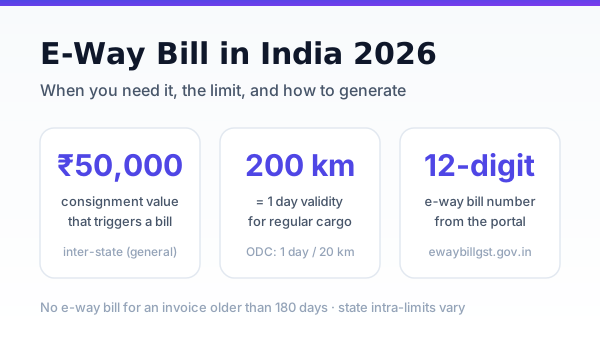
You need an e-way bill whenever you move goods worth more than ₹50,000 in one consignment. Generate it free on the government portal at ewaybillgst.gov.in before the goods leave — the system returns a 12-digit e-way bill number (EBN) that must travel with the vehicle.
It is a GST compliance document, not a tax. This guide covers the exact steps to generate one on the portal, the limit, who has to raise it, validity, the 180-day rule and penalties.
Note: RichPOS does not generate e-way bills. It makes the GST invoice (GSTINs, HSN, value and tax) that you enter as the document in Part A. The e-way bill itself is generated on ewaybillgst.gov.in.
When is an e-way bill required?
An e-way bill is mandatory when the consignment value exceeds ₹50,000 and the goods are in transit — whether by your own vehicle, a hired one, or a transporter. It applies to supply, returns, branch transfers, and even movement for job work.
- Inter-state (between states): ₹50,000 threshold applies across India.
- Intra-state (within one state): the state sets its own limit. Several states — Maharashtra, Delhi, Tamil Nadu, West Bengal and others — allow intra-state movement up to ₹1,00,000 before a bill is needed. Always confirm your own state's current limit on the portal.
Consignment value means the invoice value including GST, but excluding exempt goods carried in the same vehicle. Accurate invoice totals matter here — see our GST invoice format guide to get the base document right.
The ₹50,000 limit at a glance
| Movement | Threshold | Notes |
|---|
| Inter-state | Above ₹50,000 | Uniform across India |
| Intra-state | ₹50,000 to ₹1,00,000 | State-specific — check your state |
| Short distance, same state | Under 50 km | Part A still required; Part B (vehicle) optional |
Who has to generate it?
The duty falls first on the registered person who causes the movement — the supplier or the recipient. If you hand goods to a transporter without raising the bill, the transporter must generate it from the Part A details you provide. In practice, raise it yourself before dispatch so you keep control of the record.
How to generate an e-way bill (step by step)
The e-way bill is generated on the government portal, ewaybillgst.gov.in. Keep the GST invoice (or delivery challan) and the vehicle or transporter details ready.
- Register once. The first time, choose "e-Way Bill Registration" on the portal, enter your GSTIN, confirm the OTP sent to the mobile number registered on the GST portal, and create a username and password.
- Log in and choose "Generate New" under the e-Waybill menu.
- Pick the transaction. Outward (you are sending) or inward (you are receiving), the sub-type (supply, job work, sales return and so on) and the document type: tax invoice, bill of supply or delivery challan. Enter the document number and date.
- Fill the parties. "Bill From" and "Dispatch From", "Bill To" and "Ship To", with GSTIN, state, address and PIN code. If the buyer is unregistered, enter URP in place of the GSTIN.
- Add the items (Part A). Product name, HSN code, quantity, unit, taxable value and the CGST + SGST or IGST rate. (Unsure of a code? See how to find an HSN code.)
- Add the transport (Part B). Mode (road, rail, air or ship), the approximate distance (the portal suggests it from the two PIN codes), the transporter's name and ID, and the vehicle number. If a transporter will add the vehicle, you can leave Part B to them.
- Submit. The portal issues a 12-digit e-way bill number (EBN). Print it or keep it on a phone with the vehicle.
Other ways to generate: upload many bills at once as a JSON file (bulk generation), or, if you issue e-invoices, generate it from the IRN so Part A fills in from the e-invoice. See e-invoicing with IRN.
After generating: change vehicle, cancel, reject
- Change of vehicle: if the goods move to another vehicle, update Part B with "Update Vehicle No." before the goods move on.
- Cancel: an e-way bill can be cancelled within 24 hours of generation if the goods are not moved, or not moved as per the details. It cannot be cancelled once it has been verified in transit.
- Reject: the recipient can reject an e-way bill raised in their name within 72 hours, or before delivery if that is earlier. If they do nothing, it is treated as accepted.
Can RichPOS generate an e-way bill?
No. RichPOS makes the GST tax invoice with your GSTIN, the buyer's GSTIN, HSN codes, taxable value and tax, which is the document you enter in Part A. It does not connect to the e-way bill portal and does not generate the EBN; do that on ewaybillgst.gov.in.
Validity — how long an e-way bill lasts
Validity is distance-based, counted from the time Part B is entered:
- Regular cargo: 1 day for every 200 km (or part thereof).
- Over-dimensional cargo (ODC): 1 day for every 20 km.
If the goods are still in transit because of a genuine delay, the person who generated the bill can extend it within 8 hours before or after it expires. From 1 January 2025, an e-way bill can be extended up to a total of 360 days from the date it was first generated.
The 180-day rule (since 1 January 2025)
Since 1 January 2025 you can no longer generate an e-way bill against an invoice or other document older than 180 days. If the document date has crossed 180 days, the portal blocks generation — so move goods and raise the bill within that window, and do not sit on old invoices.
Penalty for moving goods without an e-way bill
Transporting goods above the threshold without a valid e-way bill invites a penalty of ₹10,000 or the tax sought to be evaded, whichever is higher. Goods and the vehicle can also be detained until the penalty is paid. The cost of a missing bill is far higher than the two minutes it takes to raise one.
When an e-way bill is NOT needed
- Consignment value ₹50,000 or below (subject to your state's intra-state limit).
- Goods moved by non-motorised transport (hand cart, etc.).
- Exempt goods and specified items in the notified exemption list (for example certain fresh produce).
- Movement within a notified area under state rules.
Related guides: Packing and Freight Charges in GST Invoice: Rate and HSN; Best Billing Software for Furniture Shops in India (2026); checklist before sending stock to a Blinkit warehouse.
The bottom line
If goods worth over ₹50,000 are leaving your shop or warehouse, raise the e-way bill first — it is free, takes minutes, and protects you from a ₹10,000-plus penalty and detained stock. Keep your invoices, HSN codes and GST rates accurate so the bill is right the first time. RichPOS does not generate e-way bills, but it makes the GST invoice with the right HSN and tax details that the e-way bill is based on. See how it works.
Sources: Rule 138, CGST Rules, 2017 (CBIC tax information portal); ewaybillgst.gov.in and its advisories (180-day document limit and 360-day extension cap from 1 January 2025). Portal screens change; check the latest advisories on the portal. Verify your state's current intra-state limit on the official portal before dispatch.
Moving goods without a sale, such as on approval or for job work? Read delivery challan format and rules under GST.
FAQ
Frequently asked questions
Is an e-way bill needed for goods under ₹50,000?
Generally no for inter-state movement. For intra-state movement, check your state — some require a bill only above ₹1,00,000, others from ₹50,000.
Can I generate an e-way bill without a GST number?
An unregistered person can enrol on the portal and generate one, but most movements are raised by a registered supplier, recipient, or transporter using a GSTIN.
What happens if the e-way bill expires mid-transit?
If the goods are still moving because of a genuine delay, extend it within 8 hours before or after expiry, up to a total of 360 days from first generation. Moving goods on an expired e-way bill is treated as moving without one.
How do I generate an e-way bill online?
Log in at ewaybillgst.gov.in, choose Generate New, enter the document type, number and date, the supplier and recipient details with PIN codes, the items with HSN, value and tax (Part A), and the transport mode, distance and vehicle number (Part B). Submit to get the 12-digit e-way bill number.
Can I cancel an e-way bill?
Yes, within 24 hours of generation, if the goods have not moved or have not moved as per the details. It cannot be cancelled after it has been verified in transit.
Does RichPOS generate e-way bills?
No. RichPOS makes the GST invoice you use as the document in Part A, but the e-way bill itself must be generated on ewaybillgst.gov.in.
Do I need an e-way bill for a branch transfer?
Yes. Movement between your own branches above the threshold needs a bill, even though it is not a sale.
Is one e-way bill enough for multiple invoices in one vehicle?
Each consignment needs its own e-way bill. The transporter can club them into a single consolidated e-way bill for the trip, but the individual bills must still exist.
ASWritten by Ashok SachdevFounder, RichPOS Software, Ahmedabad. We build RichPOS for Indian shops and write these guides from what shop owners ask us every day. Facts on tax rates and prices are dated; confirm GST matters with your CA. Questions? WhatsApp us.
Make GST bills in seconds with RichPOS
Billing, stock, WhatsApp bills and GST reports in one app. Free 30-day trial with no card, then ₹99/month for 3 months and ₹199/month after.