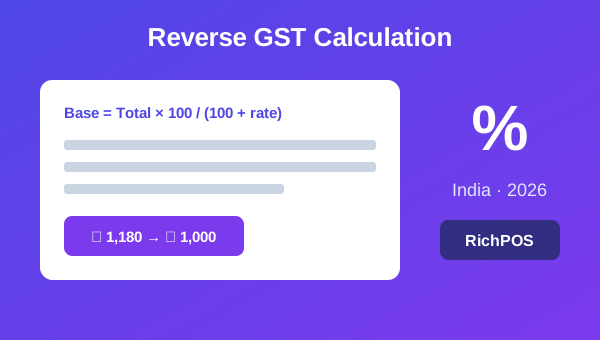
To reverse calculate GST, divide the GST-inclusive amount by (1 + rate ÷ 100) to get the base price, then subtract the base from the total to get the GST. At 18%, ₹1,180 ÷ 1.18 = ₹1,000 base and ₹180 GST. Since 22 September 2025 the main GST rates are 5%, 18% and 40%, plus 3% on gold and jewellery.
Sometimes the price you have already includes GST — an MRP, a round figure you quote a customer, or a cash total — and you need to work backwards to find the base price and the GST inside it. That is a reverse GST calculation. This guide gives you the exact formula, a worked example, and a ready reckoner for the current rates of 3%, 5%, 18% and 40%, with the old 12% and 28% rows for bills dated before 22 September 2025.
The reverse GST formula
To pull the base (taxable) amount out of a GST-inclusive total:
Base price = Total × 100 ÷ (100 + GST rate)
Then:
GST amount = Total − Base price
That is the whole method. Everything below is just applying it.
To find the base price, multiply the inclusive total by the factor below (or divide by the divisor):
GST rate
Used for
Divide total by
Base as % of total
GST as % of total
3%
Gold, silver, jewellery (Schedule IV)
1.03
97.09%
2.91%
5%
Many packaged foods and medicines; footwear and clothing up to ₹2,500 (Schedule I)
1.05
95.24%
4.76%
18%
Most other goods (Schedule II)
1.18
84.75%
15.25%
40%
Aerated sugary drinks and other listed goods (Schedule III)
1.40
71.43%
28.57%
12%
Old bills dated before 22 Sep 2025
1.12
89.29%
10.71%
28%
Old bills dated before 22 Sep 2025
1.28
78.13%
21.88%
The 12% and 28% slabs were removed for most goods from 22 September 2025, when the GST Council moved to 5%, 18% and 40% (PIB, 56th GST Council meeting). Check each item's rate before you work backwards; the free HSN and GST rate finder lists them.
Example at 5%: a ₹525 inclusive total → base = 525 ÷ 1.05 = ₹500, GST = ₹25.
Forward vs reverse GST
Forward GST adds tax on top of a base price: Total = Base × (1 + rate÷100). Reverse GST does the opposite — it strips the tax out of a total that already includes it. Use forward when you price before tax; use reverse when you start from an MRP or an all-in figure.
When retailers need reverse GST
MRP-inclusive pricing — the tag already includes tax and you need the taxable value for your records.
Round-figure quotes — you quote ₹500 flat and must back out the GST for the invoice.
Cash-till reconciliation — a day's inclusive takings, broken into base and tax by rate.
GST return prep — reports need taxable value and tax separately, not just the gross.
Skip the manual maths
Doing this by hand on every bill invites errors, especially with mixed rates in one basket. A POS applies the correct rate per item, shows the tax break-up on the invoice, and totals base and GST for your returns automatically. RichPOS does this for GST-inclusive or exclusive pricing, so your invoice format and GST summaries always agree. Start a free trial and see it on a real sale.
Reverse GST is one formula: base = total × 100 ÷ (100 + rate). Keep the ready reckoner handy for 3%, 5%, 18% and 40% (and 12% or 28% for old bills), or let your POS strip the tax out on every bill automatically. See how RichPOS works or start a free trial.
Base price = Total × 100 ÷ (100 + GST rate). Then GST amount = Total − Base price. For example, ₹1,180 at 18% gives a base of ₹1,000 and GST of ₹180.
How do I remove 18% GST from a total?
Divide the inclusive total by 1.18 to get the base price, then subtract that from the total to get the GST. So ₹1,180 ÷ 1.18 = ₹1,000 base, and ₹180 GST.
Is reverse GST the same as normal GST calculation?
No. Normal (forward) GST adds tax on top of a base price. Reverse GST starts from a total that already includes tax and works backwards to find the base price and the tax inside it.
Is there a reverse GST calculator?
Yes. The free RichPOS GST calculator removes GST from an inclusive amount: enter the total and the rate, and it shows the base price and the GST. By hand, divide the total by 1.05 for 5%, 1.18 for 18% or 1.40 for 40%.
How do I split reverse-calculated GST into CGST and SGST?
For an intra-state sale, divide the GST amount equally: half is CGST and half is SGST. On ₹180 GST that is ₹90 CGST + ₹90 SGST. For an inter-state sale the whole amount is IGST.
Founder, RichPOS Software, Ahmedabad. We build RichPOS for Indian shops and write these guides from what shop owners ask us every day. Facts on tax rates and prices are dated; confirm GST matters with your CA. Questions? WhatsApp us.
Make GST bills in seconds with RichPOS
Billing, stock, WhatsApp bills and GST reports in one app. Free 30-day trial with no card, then ₹99/month for 3 months and ₹199/month after.
GST Composition Scheme 2026 for Small RetailersGST composition scheme 2026 for retailers: turnover limit, the flat 1% tax, who qualifies, and what you give up. Plus how to bill with a bill of supply.