Most stock problems in an Indian retail shop start on the buying side, not the selling side. A supplier sends 40 chargers instead of 50 but bills for 50. A rate agreed on the phone at ₹250 shows up on the bill as ₹265. A distributor says you owe ₹18,000 and your diary says ₹12,000. A purchase order (PO) is the simple document that prevents all three. This guide explains how to run purchase orders in a small or mid-size shop, and how billing software keeps stock, supplier dues and GST in step.
What a purchase order is (and is not)
A purchase order is the document you send to a supplier listing the items, quantities and agreed rates you want to buy. It is not the supplier's invoice. The PO is your side of the deal; the supplier's tax invoice is theirs. Checking one against the other is where you catch short deliveries and rate changes before you pay.
The purchase cycle in five steps
- Decide what to buy. Use stock levels and low-stock alerts rather than memory.
- Raise the PO. Item, quantity, agreed rate, GST rate and expected delivery date. Share it on WhatsApp or email so there is a written record.
- Receive the goods against the PO. Count what arrived. If only part came, receive that part and keep the rest open.
- Match the supplier's bill. Quantity received, rate on the PO and rate on the bill should all agree. Query any difference before entering it.
- Pay and record. Payment reduces the supplier's outstanding balance in your ledger, whether you pay by UPI, NEFT, cheque or cash.
Partial deliveries: the most common mess
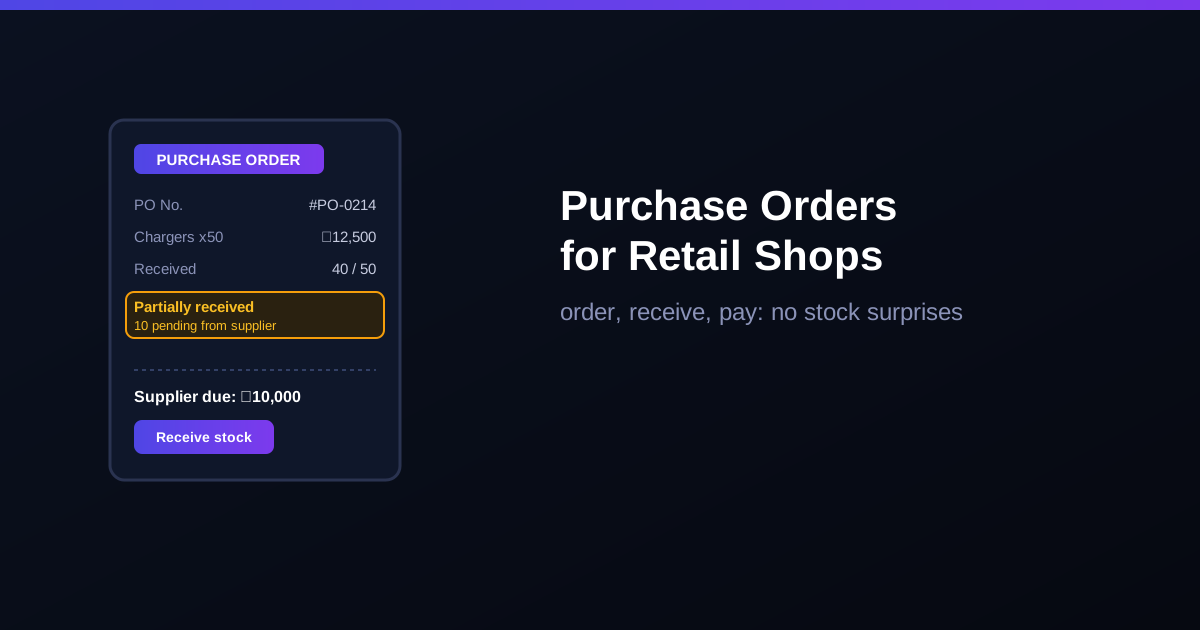
Distributors in India routinely deliver in parts, especially for fast-moving items and around festival season. Without a PO, a partial delivery gets entered as if it were the full order, and your stock count is wrong from day one. With PO-based receiving you record exactly what came in:
| Event | Stock | Supplier due | PO status |
|---|---|---|---|
| PO raised: 50 chargers at ₹250 | No change | ₹0 | Open |
| 40 received with bill | +40 | ₹10,000 | Partially received (10 pending) |
| Remaining 10 received | +10 | ₹12,500 | Fully received |
| 2 found faulty, returned | −2 | ₹12,000 | Closed with purchase return |
Amounts shown before GST for simplicity.
GST on purchases: protect your input tax credit
Every eligible purchase with GST gives you input tax credit (ITC) that reduces the GST you pay on sales. To claim it you need a valid tax invoice from a GST-registered supplier, you must have actually received the goods, and the supplier's invoice must appear in your GSTR-2B. Under Section 16(4) of the CGST Act, ITC for a financial year must be claimed by 30 November of the following year or the date you file the annual return, whichever is earlier. A PO-linked purchase entry makes this easy: every received bill is already recorded with the supplier's GSTIN, HSN and tax amounts, so you can match it against GSTR-2B each month instead of hunting for paper bills.
Supplier ledgers: know what you owe
Many shops buy on 15- to 30-day credit and settle monthly. A supplier-wise ledger shows every bill, return and payment for each supplier with the running balance, so settlement day is a check, not an argument. It also shows who you are buying most from, which helps when negotiating rates.
How RichPOS handles purchase orders
In RichPOS you raise a purchase order, then receive stock against it in full or partial quantities; inventory and the supplier balance update as goods arrive. Each supplier has a running ledger with the outstanding amount, purchase returns correct stock automatically, and you can move stock between warehouses if you run more than one store. Purchase GST is organised by HSN/SAC in the built-in reports, ready for your CA. See the purchase & suppliers feature for details.
Frequently asked questions
- Does a small retail shop really need purchase orders?
- If you buy from more than two or three suppliers, or on credit, yes. A PO is the only record of what you agreed to buy and at what price, so it is what you check the delivery and the supplier bill against.
- What is partial receiving?
- When a supplier delivers only part of an order, you receive that quantity against the PO and leave the rest open. Stock and the supplier balance update for what actually arrived, and the pending quantity stays visible until it comes or you cancel it.
- Can I claim GST input tax credit on every purchase?
- Only on eligible purchases where you hold a valid tax invoice, have received the goods, and the supplier's invoice appears in your GSTR-2B. Credit for a financial year must be claimed by 30 November of the next year or the annual return date, whichever is earlier. Confirm edge cases with your CA.
- Does RichPOS handle purchase orders and supplier dues?
- Yes. RichPOS lets you raise purchase orders, receive stock in full or partial quantities, keep a running ledger for each supplier and process purchase returns with automatic stock correction.
Bottom line: a purchase order takes a minute to raise and saves hours of stock and supplier disputes later. RichPOS includes purchase orders, supplier ledgers and GST purchase reports in every paid plan, from ₹199/month with a 30-day free trial. See pricing or call +91 90333 31255.
GST rules summarised for general guidance as of 2026; confirm your specific case with your chartered accountant.