Most shop owners know their daily sales to the rupee. Far fewer know what the shop spent this month. Rent and salaries are remembered, but the ₹200 for tea, the ₹450 auto fare for a supplier pickup and the carry bags bought in a hurry disappear from memory by evening. At month end, profit looks lower than expected and nobody can say why. This guide shows a simple way for Indian retail shops to track every expense, stay GST-ready and see where the money actually goes.
Quick answer
Record every expense on the day it is paid, with a fixed category, the amount, the payment mode (cash, UPI or bank) and a bill or reference number. Keep bills for anything with GST. Once a month, compare each category against sales in your profit and loss report. Billing software with an expense module, such as RichPOS, keeps the entries, totals and reports in one place.
Why expense tracking matters for a shop
- True profit: sales minus purchase cost is only gross margin. Rent, salaries, power and small daily costs decide what you actually keep. See how to read a profit and loss report.
- Cash that matches: unrecorded cash payments are the usual reason the drawer is short at closing. See end-of-day cash reconciliation.
- GST input credit: GST paid on eligible business expenses can reduce the GST you pay, but only if the invoice is kept and recorded.
- Income tax: business expenses reduce taxable profit, and your CA needs them organised, not in a shoebox.
Step 1: Fix a short list of categories
Too many categories and nobody uses them; too few and the report tells you nothing. Most Indian retail shops manage with 8 to 12:
| Category | Examples | GST on the bill? |
|---|---|---|
| Rent | Shop rent, godown rent | Usually 18% if the landlord is GST-registered |
| Salaries & wages | Staff salary, helper wages, festival bonus | No |
| Electricity & water | Power bill, water tanker | No GST on electricity |
| Packing material | Carry bags, boxes, tape | Yes, on a tax invoice |
| Repairs & maintenance | AC service, shutter repair, printer repair | Often yes |
| Transport & delivery | Auto fare, courier, home delivery | Depends on the provider |
| Phone & internet | Mobile recharge, broadband | Yes, 18% |
| Miscellaneous / petty cash | Tea, cleaning, small items | Mostly no bill |
GST treatment depends on the supplier and the item; confirm input tax credit eligibility with your CA.
Step 2: Record every expense the same day
Each entry needs five things: date, category, amount, payment mode and a reference (bill number, UPI transaction ID or a short note). Add who or what it was for, such as "AC service, front counter". Entering on the same day takes a minute; reconstructing a week of expenses from memory takes an hour and is never complete.
If more than one person pays expenses, give each their own login so you can see who recorded what. See multiple cashier logins and permissions.
Step 3: Separate cash from UPI and bank payments
Expenses paid from the cash drawer reduce the cash you should have at closing. Expenses paid by UPI or bank transfer do not touch the drawer but must still appear in your books. Recording the payment mode on each entry means your closing cash count and your bank statement both reconcile. Where possible, pay by UPI or bank: the transaction ID is proof on its own.
Step 4: Keep bills for GST input tax credit
If your shop is GST-registered, GST charged on eligible business expenses can usually be claimed as input tax credit, provided you hold a valid tax invoice showing your GSTIN and the supplier has filed their return. Photograph or file each bill the day you record the expense. Some credits are blocked under Section 17(5) of the CGST Act, such as food and beverages for staff in most cases, so let your CA decide what to claim. Supplier dues for stock purchases belong in the purchase ledger, not in expenses; see tracking supplier payments.
Step 5: Review expenses every month
Once a month, look at each category's total next to that month's sales. Ask three questions: which category grew faster than sales, which spend was one-off and which is now permanent, and whether any cash expense lacks a reference. This 20-minute review catches creeping costs, like a power bill rising because an old fridge is failing, long before they show up as a bad year.
A worked example: a kirana store in Nagpur
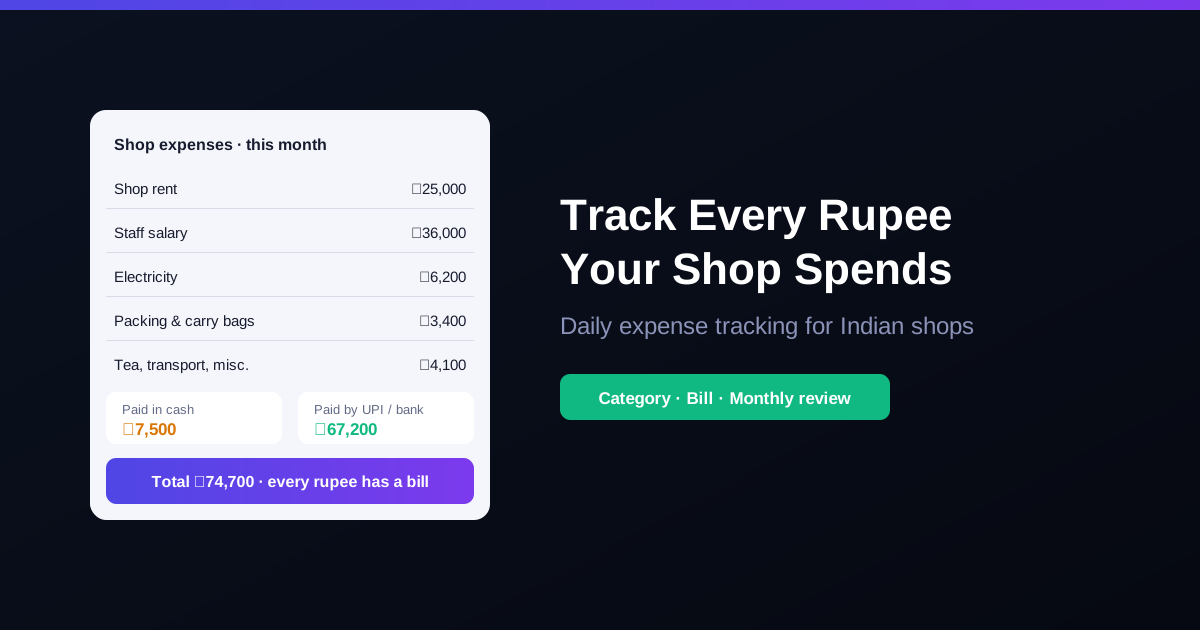
Take a kirana store in Nagpur with monthly sales of about ₹6 lakh. Its expenses for a month might look like this: rent ₹25,000, two staff salaries ₹36,000, electricity ₹6,200, carry bags and packing ₹3,400, and tea, auto fares and small items ₹4,100, a total of ₹74,700. The owner remembers rent and salaries, which is ₹61,000, but not the other ₹13,700. Across a year that is over ₹1.6 lakh of spending that never reached the books, profit that looked real on paper and cash that went missing from the drawer. If the landlord is GST-registered and charges 18% on the ₹25,000 rent, the ₹4,500 GST on that invoice may be claimable as input credit too, but only if the bill is recorded and kept. The figures are illustrative; your shop's numbers will differ.
How RichPOS helps track shop expenses
- Expense entries with categories: create your own expense categories and record each expense with the category, amount, payment type, a reference number and what it was for.
- Accounts & cash: daily cash in and out, bank deposits and transfers in one ledger, with cash-in-hand tracked per counter or store.
- GST & reports: 20+ reports including expense summaries, profit and loss and GST on purchases, ready to share with your CA.
- Users & roles: control who can add, edit or view expenses, and keep profit data away from counter staff.
RichPOS costs ₹199/month with a 30-day free trial. See pricing.
Frequently asked questions
- What is the easiest way to track shop expenses?
- Record every expense on the day it is paid, with a category, the amount, how it was paid (cash, UPI or bank) and a bill or reference number. Keep the categories few and fixed, and review the totals once a month against your sales and profit. Billing software with an expense module does the totals and reports for you.
- Which shop expenses can I claim GST input tax credit on?
- Generally you can claim input tax credit on GST charged for business expenses when you have a valid tax invoice from a GST-registered supplier, such as commercial rent from a registered landlord, packing material or repairs. Some items are blocked under Section 17(5) of the CGST Act, such as food and beverages for staff in most cases, and costs like electricity carry no GST at all. Confirm with your CA before claiming.
- Should small cash expenses like tea and transport be recorded?
- Yes. Small cash payments add up to thousands of rupees a month and are the most common reason the cash drawer does not match the books. Record them as they happen, in a petty cash or miscellaneous category.
- How often should a shop owner review expenses?
- Enter expenses daily and review them monthly. A monthly look at each category against sales shows which costs are growing faster than your business, before they eat into profit.
Bottom line: record every expense the same day with a category, payment mode and reference, keep GST bills, and review the totals monthly. Want to see expense tracking with your own categories? Call +91 90333 31255 for a demo, or start the 30-day free trial from the pricing page.
GST and income tax information is general guidance; confirm what applies to your business with your CA.