Accounts & Cash
Track every rupee that moves through your business — daily cash in/out, bank deposits, internal transfers between accounts — inside a proper double-entry-friendly ledger, not a spreadsheet.
Intro offerRegular price ₹199₹99/monthfirst 3 months · then ₹199
After the free 30-day trial · or ₹1,999/year · Billing, stock & GST included
RichPOS at a glance
Updated
| What it is | RichPOS: GST billing and point-of-sale (POS) software for shops in India |
|---|---|
| Best for | Accounts & Cash: Track every rupee that moves through your business — daily cash in/out, bank deposits, internal transfers between accounts — inside a proper double-entry-friendly ledger, not a spreadsheet. |
| Not the right pick if | You need offline billing, GST e-invoices (IRN), e-way bills or a weighing scale connected directly to the computer. RichPOS does not do these (it does read the barcode labels printed by label-printing weighing scales). |
| Price | Free 30-day trial, then Dukaan ₹99/month for the first 3 months, ₹199/month after, or ₹1,999/year (about ₹5.50 a day). Bigger plans: Dukaan Plus ₹399, Business ₹599, Business Pro ₹899 a month. Every plan has billing, stock, udhaar, GST reports, WhatsApp bill sharing and unlimited devices; staff users: 2 on Dukaan, 5 on Dukaan Plus, unlimited on Business and Business Pro (the owner login is not counted). No GST, no setup fee. |
| Free trial | 30 days, no card needed. Up to 200 items & customers, 500 invoices, 1 warehouse and 1 user. |
| Runs on | One web app in any modern browser on a PC, laptop, tablet or phone (iPhone and iPad too), free Windows, Mac and Linux desktop apps, and an Android app. Prints on 58/80 mm thermal and A4 printers. |
| GST | GST bills with HSN codes and CGST/SGST/IGST split, GSTR-1-ready reports, Tally export. Does not generate e-invoices (IRN) or e-way bills. |
| Internet | Needed, also in the desktop apps. There is no offline mode. |
| Backups | RichPOS backs up all shop data daily on its servers. Export your reports to Excel, CSV or PDF anytime. |
| If your plan ends | If your plan ends, your data stays in your account. You can still log in to view it and export it to Excel/CSV. |
| Made by | RichPOS Software, Ahmedabad, Gujarat, India. Support in English and Hindi on WhatsApp +91 90333 31255. |
Accounts & Cash in RichPOS
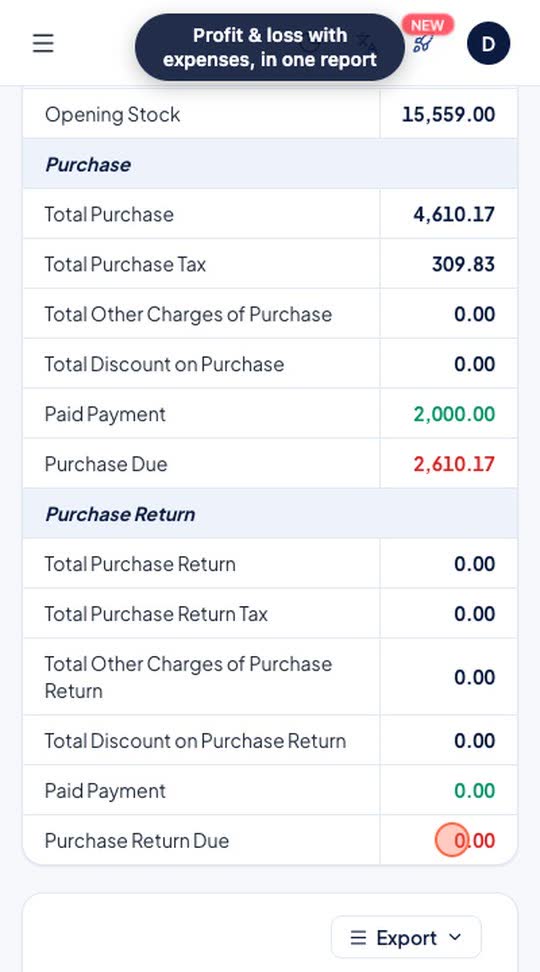
Record a shop expense with its category, payment mode and amount. It is listed under expenses and is taken into the profit & loss report.
Who it's for: Owners who want rent, electricity and daily costs in the same books as sales.
- Expenses > Add: category, paid by, amount
- Save
- Reports > Profit & Loss
Real screen recording of the RichPOS web app on a phone-size screen, with a demo store and demo data. No sound.
How it works
Most shop owners track cash in a notebook and find out about the shortfall a week too late. RichPOS puts every rupee that moves through your business into one ledger — daily cash in and out, bank deposits, and transfers between accounts and stores — so cash-in-hand always matches reality.
Because the ledger is tied to every sale and purchase, your accounts aren't a separate chore done at month-end; they build themselves as you trade. Deposit tracking with bank-reconciliation support means the figure in RichPOS and the figure in your bank statement finally agree.
What you get
- Daily cash-in-hand tracking per counter or store
- Money transfers between accounts and stores
- Full accounts ledger tied to every sale and purchase
- Deposit tracking with bank reconciliation support
Trial: Up to 200 items & customers, 500 invoices, 1 warehouse and 1 user.
Shops that use Accounts & Cash
Owners tired of reconciling a cash notebook by hand
Shops moving money between counters, stores and banks
Businesses that want accounts to update as they sell
Anyone doing bank reconciliation at month-end
See RichPOS for clothing & garment shops, mobile & electronics shops, mobile repair shops, kirana & grocery stores, footwear & shoe shops, cosmetics & beauty stores, stationery & gift shops, medical stores & chemists and hardware & sanitary shops.
Accounts & Cash questions
How does Accounts & Cash work in RichPOS?
Record a shop expense with its category, payment mode and amount. It is listed under expenses and is taken into the profit & loss report. Steps: 1) Expenses > Add: category, paid by, amount; 2) Save; 3) Reports > Profit & Loss.
What does the Accounts & Cash module track?
It tracks daily cash in and out, bank deposits and internal transfers between accounts inside a ledger tied to every sale and purchase.
Can I track cash per counter or store?
Yes. RichPOS tracks cash-in-hand per counter or per store.
Does it support bank reconciliation?
Yes. Deposit tracking with bank reconciliation support is built in.
More in RichPOS
GST & 20+ Reports
Profit & loss, sales/purchase GST reports, stock, expense and tax reports, ready to export.
Learn moreSMS, Email & WhatsApp
Send bills on WhatsApp, SMS or email, and one-click WhatsApp payment reminders.
Learn moreMobile Repair Shop Module
Built-in repair job tracking, templates and owner reminders for repair businesses.
Learn moreKeep reading
Guides and a free tool related to Accounts & Cash:
Try Accounts & Cash free for 30 days
No card needed. Billing, stock, udhaar and GST reports included.