Every shop issues a wrong bill sooner or later: a wrong GSTIN, a wrong rate, a wrong amount, or a sale that never went through. Under GST you cannot just tear up the bill and move on. What you do depends on one question: has the invoice already been reported in a filed GSTR-1? This guide explains how to cancel or correct a GST invoice at each stage, the time limits, and the special rule for e-invoices.
Quick answer
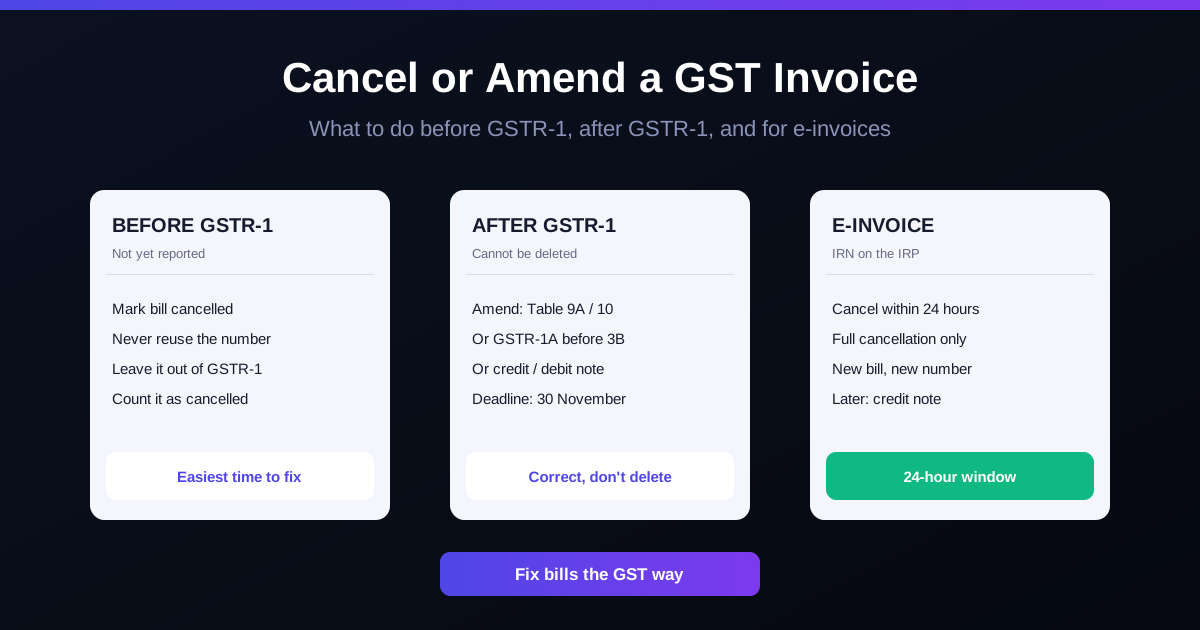
Before the invoice is reported in a filed GSTR-1, mark it cancelled in your books, keep its number in the series, and leave it out of the return. After GSTR-1 is filed, you cannot delete it: amend it in a later GSTR-1 (Table 9A or 10) or GSTR-1A, or issue a credit or debit note. Corrections must be made by 30 November after the financial year ends, or the annual return date if earlier. An e-invoice IRN can be cancelled only within 24 hours, and only in full.
Which fix to use
| Situation | What to do |
|---|---|
| Sale never happened, GSTR-1 not filed | Mark the invoice cancelled, do not reuse the number, leave it out of GSTR-1, show it in the cancelled count of the documents-issued table |
| Wrong GSTIN, place of supply or invoice details, GSTR-1 filed | Amend in a later GSTR-1 (Table 9A or 10), or in GSTR-1A before that period's GSTR-3B |
| Value or tax was too high, or goods came back | Issue a credit note |
| Value or tax was too low | Issue a debit note |
| E-invoice with an error, within 24 hours | Cancel the IRN on the IRP and raise a fresh invoice with a new number |
| E-invoice with an error, after 24 hours | Credit note or GSTR-1 amendment; the IRN stays |
Before GSTR-1 is filed
This is the easy case. The invoice exists in your books but the government has not seen it yet.
- Keep the number. GST invoices must run in one consecutive series for the financial year. Mark the bill "cancelled" rather than deleting it, and do not issue the same number again.
- Leave it out of GSTR-1. If you have already saved it in an unfiled GSTR-1 on the portal, delete it there.
- Report the cancelled count. GSTR-1 has a table for documents issued during the period, which asks for the number range and how many were cancelled.
After GSTR-1 is filed
Once filed, the invoice cannot be deleted from GSTR-1. You have three ways to correct it:
- Amend in a later GSTR-1. Table 9A covers B2B, large B2C and export invoices; Table 10 covers small B2C sales. You can fix the recipient's GSTIN, the invoice details, the value or the rate. If you amend the invoice to zero, that effectively cancels it.
- Use GSTR-1A. This optional form lets you correct the same period's GSTR-1 after filing it but before you file that period's GSTR-3B.
- Issue a credit or debit note. When only the value or tax changes, a note linked to the original invoice is often simpler than an amendment.
Remember that your B2B customer's input tax credit follows what you report. A wrong GSTIN means the credit shows up for the wrong business, so fix it quickly. See GSTR-1 vs GSTR-3B for how the two returns fit together.
The time limit
Amendments and credit notes for a financial year are allowed until 30 November after that year ends, or the date you file the annual return, whichever comes first. For bills from April 2025 to March 2026, the last date is 30 November 2026. After that, the tax on an over-billed invoice cannot be reduced through a credit note.
E-invoices: the 24-hour rule
If your business generates e-invoices, each one gets an IRN from the Invoice Registration Portal. The IRN can be cancelled on the portal only within 24 hours, and only as a whole invoice. If an e-way bill is active against it, cancel the e-way bill first. The cancelled invoice number cannot be used for a new IRN, so the corrected bill needs a fresh number. After 24 hours, use a credit note or a GSTR-1 amendment. See the e-invoicing guide for who must e-invoice.
A worked example: a shop in Coimbatore
An electrical goods shop in Coimbatore sells to contractors and walk-in customers. In one month it runs into three problems:
| Problem | Stage | Fix |
|---|---|---|
| Bill no. 1482 raised twice for the same sale | GSTR-1 not yet filed | Mark 1482 cancelled, leave it out of GSTR-1, report 1 cancelled document |
| ₹59,000 bill (₹50,000 + ₹9,000 GST at 18%) with the contractor's GSTIN typed wrong | GSTR-1 filed | Amend the GSTIN in Table 9A of next month's GSTR-1 |
| Contractor returns fittings worth ₹11,800 (₹10,000 + ₹1,800 GST) | Two weeks after the sale | Issue a credit note for ₹11,800 against the original invoice |
None of these fixes involve deleting anything. The shop, bill numbers and amounts are illustrative.
Habits that prevent wrong bills
- Check the customer's GSTIN before billing B2B sales, not after.
- Review the day's bills before GSTR-1, when fixing is still easy.
- Handle returns through a proper return entry, so stock and tax are corrected together. See return and refund management.
- Use a correct invoice format from the start. See GST invoice format for shops.
How RichPOS helps
- Sales returns that correct stock and the ledger automatically, so a returned item never leaves your records out of sync. See Billing & POS.
- A full activity log per user, so you can see who created or changed a bill. See Users & roles.
- GST-ready sales reports by HSN/SAC, exported to Excel, CSV or PDF, to check your bills before GSTR-1 is filed. See GST & reports.
RichPOS costs ₹199/month (₹2,000/year) with a 30-day free trial. See pricing.
Frequently asked questions
- Can I delete a GST invoice?
- Not from your records. Invoices must follow one serial number series, so a wrong invoice is marked cancelled and its number is not reused. If the invoice has not yet been reported in a filed GSTR-1, you simply leave it out of the return (or delete it from the saved, unfiled GSTR-1) and report it as cancelled in the documents-issued table.
- How do I correct an invoice after filing GSTR-1?
- Amend it in a later GSTR-1 using the amendment tables (Table 9A for B2B, large B2C and export invoices, Table 10 for small B2C sales), or in GSTR-1A for the same period before you file that period's GSTR-3B. If only the value or tax has changed, you can issue a credit note or debit note instead.
- What is the last date to amend an invoice or issue a credit note?
- 30 November after the end of the financial year, or the date you file the annual return, whichever is earlier. For invoices from FY 2025-26, that is 30 November 2026 at the latest.
- Can I cancel an e-invoice (IRN)?
- Yes, but only within 24 hours of generating the IRN, and only in full; partial cancellation is not allowed. The same invoice number cannot be used again for a new IRN. After 24 hours, correct the sale with a credit note or an amendment in GSTR-1.
- Should I issue a credit note or cancel the invoice when a customer returns goods?
- Issue a credit note. The original sale happened and was reported, so the return is recorded as a credit note that reduces your output tax, rather than cancelling the invoice.
Bottom line: a GST invoice is never deleted, only cancelled before it is reported, or corrected after it is reported through an amendment or a credit or debit note, all before 30 November of the next year. Catch mistakes before GSTR-1 and most fixes take a minute. Want returns and GST reports straight from your billing counter? Call +91 90333 31255 for a demo, or start the 30-day free trial from the pricing page.
This is general guidance, not tax advice. Return forms, tables and time limits are set by GST law and CBIC notifications and can change; confirm with your CA for your business.