Every month your GSTR-3B asks how much input tax credit (ITC) you are claiming. The GST portal no longer takes your word for it. It compares your claim with GSTR-2B, a statement built from what your suppliers have filed. If the two do not match, you either lose credit you are owed or claim credit you will have to pay back with interest. Reconciling GSTR-2B with your purchase register before you file is how a shop stays on the right side of both.
Quick answer
GSTR-2B reconciliation means matching every purchase invoice in your books with GSTR-2B before filing GSTR-3B. Claim ITC only for invoices that appear in both and are correct. Hold invoices that are missing from GSTR-2B until your supplier files, fix typing errors in your own books, and reject or query invoices in GSTR-2B that you never received. Since 1 January 2022, Section 16(2)(aa) allows ITC only if the invoice is in GSTR-2B.
GSTR-2A vs GSTR-2B
| Point | GSTR-2A | GSTR-2B |
|---|---|---|
| Nature | Dynamic, changes whenever a supplier files or amends | Static statement for each tax period |
| When available | Updates continuously | Generated on the 14th of the following month |
| Use | Tracking supplier filings over time | Basis for ITC you can claim in GSTR-3B |
For the basics of claiming credit, start with input tax credit for retail shops. For how the returns fit together, see GSTR-1 vs GSTR-3B.
Step by step: reconcile before you file GSTR-3B
- Close your purchase register for the month. Every supplier bill must be entered with the supplier's GSTIN, invoice number, date, taxable value and the IGST, CGST and SGST amounts.
- Act on invoices in IMS. Since October 2024, the Invoice Management System on the GST portal lets you accept, reject or keep pending each invoice your suppliers upload. Invoices you leave alone are treated as accepted.
- Download GSTR-2B after the 14th of the following month, in Excel, from the Returns dashboard.
- Match invoice by invoice. Use supplier GSTIN plus invoice number as the key, then compare dates and tax amounts.
- Sort every difference into one of the buckets below and take the action listed.
- File GSTR-3B with ITC equal to what matched, plus earlier-month invoices that have now appeared in GSTR-2B.
Common mismatches and what to do
| Mismatch | Usual cause | Action |
|---|---|---|
| In your books, not in GSTR-2B | Supplier has not filed GSTR-1, or filed after the cut-off | Do not claim yet. Follow up with the supplier and claim in the month it appears. |
| Missing because of wrong GSTIN | Supplier typed the wrong GSTIN or reported the bill as B2C | Ask the supplier to amend in GSTR-1 so it moves to your GSTIN. |
| Both sides, numbers differ | Typing error in invoice number, date or amount | Check the paper bill and correct whichever side is wrong. |
| IGST in one, CGST/SGST in the other | Wrong place of supply | Supplier must amend; you cannot adjust it yourself. |
| In GSTR-2B, not in your books | Bill not entered yet, goods not received, or an invoice you do not recognise | Enter it if genuine. If you never bought it, reject it in IMS. |
| Credit note in GSTR-2B | Supplier issued a credit note for a return or discount | Reduce your ITC by the credit note amount. |
| Appears in GSTR-2B but blocked | Section 17(5) items such as food, personal use or motor vehicles | Do not claim even though it is shown. |
Worked example: a garment shop in Surat
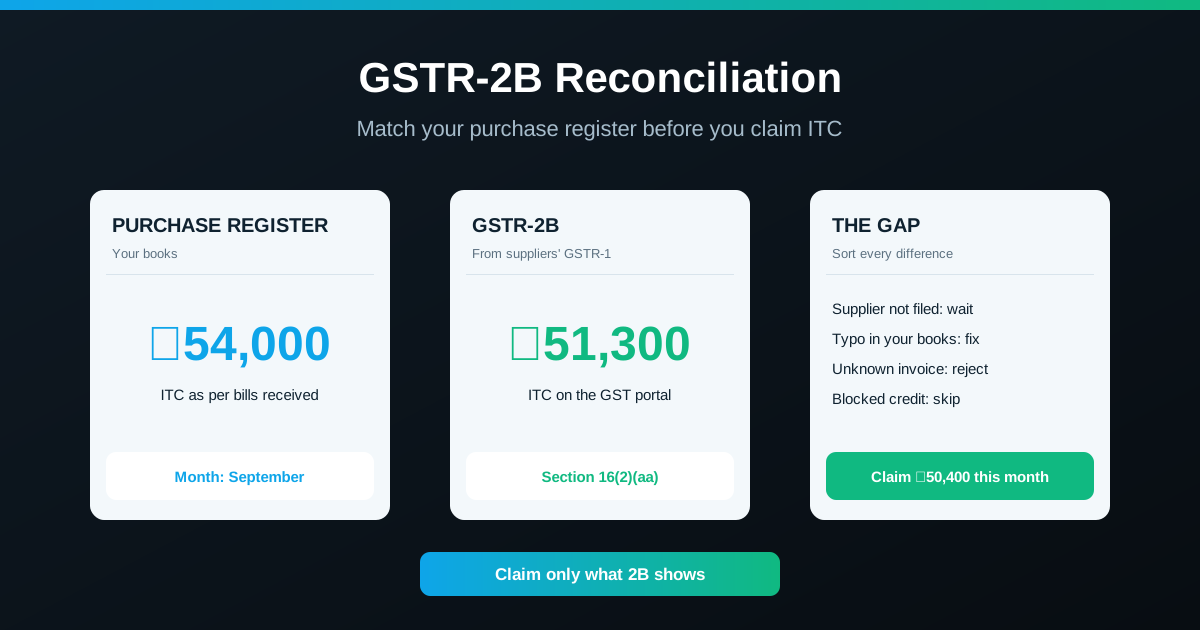
A garment shop in Surat reconciles its September purchases in October.
| Item | ITC | Action |
|---|---|---|
| Purchase register total | ₹54,000 | |
| Matched on both sides | ₹48,600 | Claim |
| Supplier A has not filed GSTR-1 (in books only) | ₹3,600 | Hold; claim when it appears |
| Invoice typed as INV-412 in books, INV-421 in GSTR-2B | ₹1,800 | Correct the entry, then claim |
| Unknown invoice in GSTR-2B only | ₹900 | Investigate; reject in IMS if not yours |
| GSTR-2B total (48,600 + 1,800 + 900) | ₹51,300 | |
| ITC to claim in September GSTR-3B | ₹50,400 | |
| ITC held for a later month | ₹3,600 |
Had the shop simply claimed its book figure of ₹54,000, it would have claimed ₹3,600 more than GSTR-2B supports. The figures are illustrative.
What happens if you claim more than GSTR-2B
- Excess credit is recovered with interest. Wrongly availed and used ITC carries interest, and penalties can follow on notice.
- System intimation. Where ITC in GSTR-3B exceeds GSTR-2B beyond the notified limit, the portal can issue an intimation (Form DRC-01C) asking you to pay or explain. Confirm the current threshold with your CA.
- Late filing still costs. Holding off filing to wait for suppliers adds GSTR-3B late fee and interest; file on time and claim held ITC later.
Two deadlines to remember
- Section 16(4): ITC on invoices of a financial year must be claimed by 30 November of the next year or the date you file the annual return, whichever is earlier. Track held invoices so none cross this date; the year-end check ties into GSTR-9.
- 180-day payment rule: if you do not pay the supplier within 180 days of the invoice date, the ITC must be reversed with interest and can be re-claimed once you pay. Keep supplier dues visible with a supplier payments ledger.
How RichPOS helps
- A clean purchase register. Purchase orders with partial or full receiving, purchase returns and a running ledger for every supplier. See Purchases & suppliers.
- Reports to match against GSTR-2B. GST-ready purchase reports by HSN/SAC with one-click export to Excel, CSV or PDF, ready to compare with the GSTR-2B download. See GST & reports.
- Supplier dues in one place. Every purchase posts to the ledger, so unpaid bills nearing 180 days are easy to spot. See Accounts & cash.
The matching itself is done against the GSTR-2B file from the GST portal. RichPOS costs ₹199/month (₹2,000/year) with a 30-day free trial. See pricing.
Frequently asked questions
- What is GSTR-2B reconciliation?
- It is the monthly check of your purchase register against GSTR-2B, the input tax credit statement the GST portal builds from your suppliers' GSTR-1 filings. Every purchase invoice is marked as matched, in your books only, or in GSTR-2B only, and you claim input tax credit in GSTR-3B only for invoices that pass the check.
- Can I claim ITC that is not shown in GSTR-2B?
- No. Since 1 January 2022, Section 16(2)(aa) of the CGST Act allows input tax credit only when the invoice has been furnished by the supplier and appears in your GSTR-2B. Hold the credit until the supplier files and the invoice shows up in a later month's GSTR-2B, within the Section 16(4) time limit.
- What is the difference between GSTR-2A and GSTR-2B?
- GSTR-2A is dynamic: it keeps changing as suppliers file or amend their returns, even late. GSTR-2B is a static statement for each tax period, generated on the 14th of the following month, and it is the statement your GSTR-3B input tax credit is checked against.
- What is IMS in GST?
- The Invoice Management System, live on the GST portal since October 2024, lets a buyer accept, reject or keep pending each invoice uploaded by suppliers before GSTR-2B is finalised. Invoices with no action are treated as accepted. If you act after the 14th, you can recompute GSTR-2B before filing GSTR-3B. Confirm current IMS rules on the portal.
- What is the last date to claim missed ITC?
- Under Section 16(4), input tax credit for invoices of a financial year must be claimed by 30 November of the following year or the date you file the annual return, whichever is earlier. An invoice your supplier uploads late can still be claimed in a later month, but only within this deadline.
Bottom line: Reconcile your purchase register with GSTR-2B every month before filing GSTR-3B. Claim what matches, hold what your supplier has not filed, fix your own typing errors and reject invoices you never received. Watch the Section 16(4) deadline for held credit. For a demo of RichPOS, call +91 90333 31255 or start the 30-day free trial from the pricing page.
This guide is general information based on the CGST Act, CGST Rules and GST portal features as of October 2026, not tax advice. Rules change; confirm your position with a qualified CA.