Updated 18 October 2026 · By Ashok Sachdev · GST rules from section 34 of the CGST Act (CBIC). How Blinkit's sheet F lists notes is as seen in October 2026; confirm treatment with your CA.
Quick answer
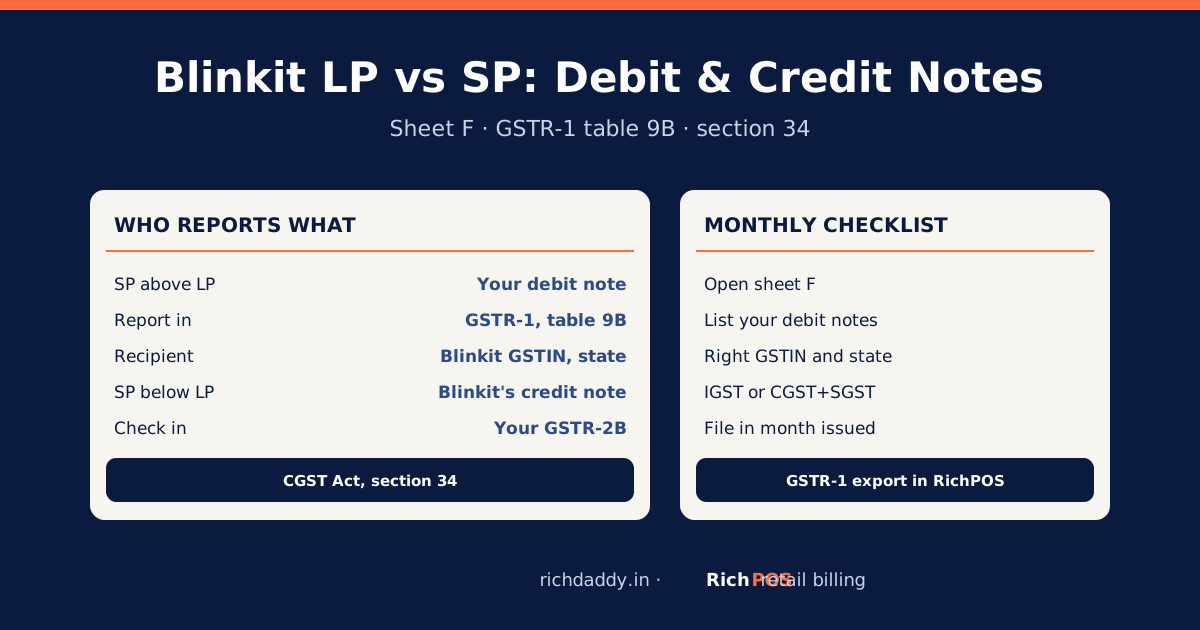
On Blinkit, LP is the landing price on your invoice to Blinkit and SP is the selling price at which the item actually sold. The LP–SP adjustment sheet (F) lists the difference as notes: when an item sold above your landing price, the note is a debit note that you report in your GSTR-1, table 9B (CDNR), against Blinkit's GSTIN for that warehouse's state; when it sold below, the credit note is Blinkit's and you match it in your GSTR-2B. Under section 34 of the CGST Act, a debit note goes in the return for the month in which it is issued.
Sheet F is the one most sellers skip because it does not change the payout. But it changes your GST: an unreported debit note means tax you should have paid and did not. This guide explains the logic, the GST rule behind it and a monthly checklist.
Why LP–SP notes exist
When you send stock to Blinkit, you invoice it at the landing price. If the item later sells at a different price, the value of the supply has changed. GST law handles a change in value after the invoice with notes: a debit note when the taxable value turns out higher than invoiced, and a credit note when it turns out lower (CGST Act, section 34 (CBIC), sub-sections 1 and 3).
| Sold above landing price (SP > LP) | Sold below landing price (SP < LP) |
|---|
| Note | Debit note | Credit note |
| Who issues it (as sheet F treats it) | You, the seller | Blinkit |
| Where it goes | Your GSTR-1, table 9B (CDNR), recipient Blinkit's GSTIN for the warehouse state | Not in your GSTR-1; check it appears in your GSTR-2B |
| GST effect for you | More output tax | Follow your CA's advice on input credit |
| Time limit | Return for the month the debit note is issued (s.34(4)) | For credit notes the law sets 30 November after the year end or the annual return, whichever is earlier (s.34(2)) |
Worked example (illustrative numbers)
You invoice 100 units of a snack to Blinkit's warehouse in another state at a landing price of ₹50 each, 5% GST. Sixty sell at ₹52 (₹2 above LP) and forty at ₹48 (₹2 below).
- Debit note (yours): 60 × ₹2 = ₹120 taxable; IGST 5% = ₹6, because the warehouse is in another state. Report it in GSTR-1, table 9B, for the month you issue it.
- Credit note (Blinkit's): 40 × ₹2 = ₹80 taxable, GST ₹4. Check it appears in your GSTR-2B.
The numbers are made up to show the arithmetic. If the warehouse were in your own state, the ₹6 would be CGST ₹3 + SGST ₹3.
Monthly checklist
| Step | What to do |
|---|
| 1 | Open sheet F for every payout cycle in the month, including cycles you have already accepted. |
| 2 | Separate debit notes (SP above LP) from credit notes (SP below LP). |
| 3 | For each debit note, find Blinkit's GSTIN for the warehouse's state, and set IGST or CGST+SGST by place of supply. |
| 4 | Enter the debit notes in GSTR-1, table 9B, with note number, date and value. |
| 5 | Match Blinkit's credit notes against your GSTR-2B; follow up any that are missing. |
| 6 | Keep the sheet and your workings with your GST records. |
Where table 9B sits among your returns: GSTR-1 vs GSTR-3B. More on notes in general: debit note in GST and credit note in GST. Reading the whole payout: Blinkit payout sheet explained.
Doing it without spreadsheets
RichPOS Marketplace Accounts reads sheet F, lists your debit notes with Blinkit's GSTIN and the IGST or CGST+SGST split checked against the place of supply, flags notes not yet reported in GSTR-1, and exports them for GSTR-1 table 9B. Blinkit's credit notes are tracked as expected in GSTR-2B. See Marketplace Accounts for Blinkit sellers.
Bottom line
Sheet F does not move your payout, but it moves your GST. Report your debit notes in GSTR-1 every month and match Blinkit's credit notes in GSTR-2B. To export them ready for GSTR-1, see RichPOS Marketplace Accounts or start a free trial.
FAQ
Frequently asked questions
What is LP and SP on Blinkit?
LP is the landing price on your invoice to Blinkit, and SP is the selling price at which the item sold. The LP–SP adjustment sheet lists the difference for each item as a note.
Why do I get debit notes from the Blinkit LP–SP sheet?
When an item sells above your landing price, the value of your supply is higher than you invoiced. Section 34(3) of the CGST Act requires a debit note for that difference, and sheet F lists it.
Where do I report Blinkit debit notes in GSTR-1?
In table 9B (credit and debit notes to registered persons, CDNR), against Blinkit's GSTIN for the state of the warehouse, in the return for the month the debit note is issued.
Do I report Blinkit's credit notes in my GSTR-1?
No. As sheet F treats them, the credit notes for items sold below the landing price are Blinkit's. Check that they appear in your GSTR-2B and follow your CA's advice on input credit.
Is IGST or CGST+SGST charged on a Blinkit debit note?
It follows the place of supply: IGST if Blinkit's warehouse is in another state, CGST plus SGST if it is in your state.
What happens if I do not report LP–SP debit notes?
Your GSTR-1 under-reports output tax, which can lead to a mismatch, tax with interest and possibly a penalty later. Report them every month.