SMS, Email & WhatsApp
Quick answerYes, RichPOS lets you send the GST bill to your customer on WhatsApp, SMS or email from the billing screen. A WhatsApp share link that opens your own WhatsApp is always available. Stores on the default RichPOS WhatsApp setup can also send the bill PDF and one-click due reminders from the RichPOS WhatsApp account, using WhatsApp credits.
Keep customers in the loop from the app: send bills, payment due reminders and promotional messages over SMS, email or WhatsApp without leaving the billing screen. A WhatsApp due reminder goes out in one click and uses a WhatsApp message credit.
Intro offerRegular price ₹199₹99/monthfirst 3 months · then ₹199
After the free 30-day trial · or ₹1,999/year · Billing, stock & GST included
RichPOS at a glance
Updated
| What it is | RichPOS: GST billing and point-of-sale (POS) software for shops in India |
|---|---|
| Best for | SMS, Email & WhatsApp: Keep customers in the loop from the app: send bills, payment due reminders and promotional messages over SMS, email or WhatsApp without leaving the billing screen. A WhatsApp due reminder goes out in one click and uses a WhatsApp message credit. |
| Not the right pick if | You need offline billing, GST e-invoices (IRN), e-way bills or a weighing scale connected directly to the computer. RichPOS does not do these (it does read the barcode labels printed by label-printing weighing scales). |
| Price | Free 30-day trial, then Dukaan ₹99/month for the first 3 months, ₹199/month after, or ₹1,999/year (about ₹5.50 a day). Bigger plans: Dukaan Plus ₹399, Business ₹599, Business Pro ₹899 a month. Every plan has billing, stock, udhaar, GST reports, WhatsApp bill sharing and unlimited devices; staff users: 2 on Dukaan, 5 on Dukaan Plus, unlimited on Business and Business Pro (the owner login is not counted). No GST, no setup fee. |
| Free trial | 30 days, no card needed. Up to 200 items & customers, 500 invoices, 1 warehouse and 1 user. |
| Runs on | One web app in any modern browser on a PC, laptop, tablet or phone (iPhone and iPad too), free Windows, Mac and Linux desktop apps, and an Android app. Prints on 58/80 mm thermal and A4 printers. |
| GST | GST bills with HSN codes and CGST/SGST/IGST split, GSTR-1-ready reports, Tally export. Does not generate e-invoices (IRN) or e-way bills. |
| Internet | Needed, also in the desktop apps. There is no offline mode. |
| Backups | RichPOS backs up all shop data daily on its servers. Export your reports to Excel, CSV or PDF anytime. |
| If your plan ends | If your plan ends, your data stays in your account. You can still log in to view it and export it to Excel/CSV. |
| Made by | RichPOS Software, Ahmedabad, Gujarat, India. Support in English and Hindi on WhatsApp +91 90333 31255. |
SMS, Email & WhatsApp in RichPOS
Customer Connect fills a ready message (Diwali offer, new stock, thank you) for a list of your customers; tap Send and WhatsApp opens with it, free from your own WhatsApp. Bills on WhatsApp can always go as a share link from your own WhatsApp; stores on the default RichPOS WhatsApp setup can also send the bill PDF from the RichPOS WhatsApp account (WhatsApp credits), or use their own provider set up in SMS/WhatsApp API.
Who it's for: Shops that want to bring customers back and send bills without printing.
- Marketing > Customer Connect: pick a message and a list
- Tap Send for each customer
- Settings > SMS/WhatsApp API for your own provider
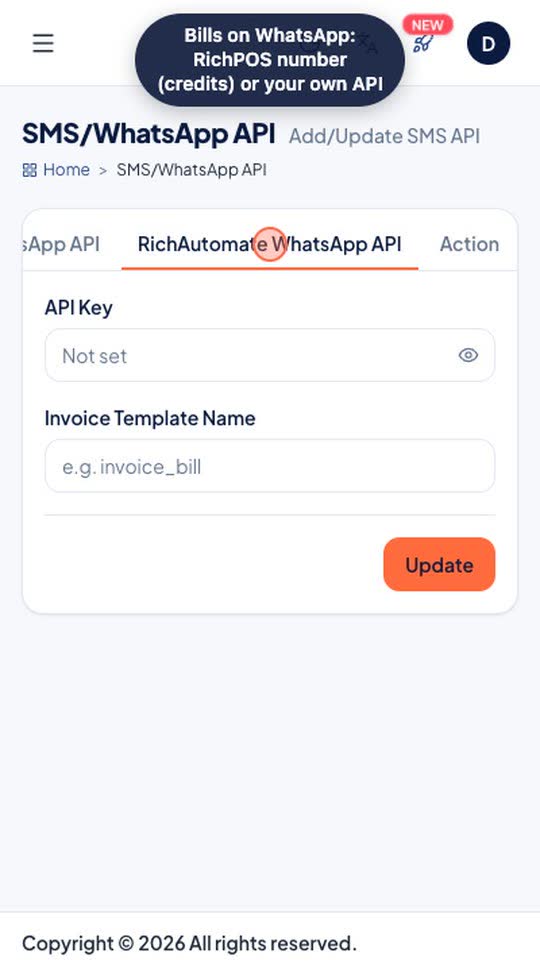
Real screen recording of the RichPOS web app on a phone-size screen, with a demo store and demo data. No sound.
How it works
A bill your customer can pull up on their phone is a bill that gets paid and a customer who comes back. RichPOS sends invoices, payment-due reminders and promotions over SMS, email and WhatsApp — the channels your customers already read — without you ever leaving the billing screen.
A payment reminder with the customer's name and due amount goes out in one click from the customer list. An SMS can go to many numbers at once through your own SMS gateway. For free offers and win-back messages, Customer Connect gives you wa.me links that you tap to send from your own WhatsApp.
More on this: udhaar tracking with WhatsApp payment reminders.
What you get
- Bills on SMS, email or WhatsApp from the billing screen
- One-click WhatsApp payment reminders with the due amount
- SMS to many numbers at once through your SMS gateway
Trial: Up to 200 items & customers, 500 invoices, 1 warehouse and 1 user.
How each message is sent
| Message | How it is sent | Credits |
|---|---|---|
| Bill on WhatsApp (share link) | A wa.me link opens your own WhatsApp with the bill link filled in; you tap send | No credit |
| Bill PDF on WhatsApp | From the RichPOS WhatsApp account, for stores on the default RichPOS WhatsApp setup | Uses a WhatsApp credit per message |
| Bill through your own WhatsApp provider | Your provider (RichAutomate or FiveMojo), set up in Settings > SMS/WhatsApp API | Your provider's charges, no RichPOS credit |
| Payment due reminder | One click from the customer list, with the customer's name and due amount; it goes when you click, not on a schedule | Uses a WhatsApp credit per message |
| Bill by SMS | Your own SMS gateway | Your gateway's rate |
| Bill by email | Your own email account | No credit |
| Offers, birthdays, win-back (Customer Connect, Dukaan Plus and above) | A wa.me link; you tap send in your own WhatsApp, one chat at a time | No credit |
Shops that use SMS, Email & WhatsApp
Shops that give credit and chase due payments
Businesses running festival or clearance promotions
Owners who want customers to keep a digital bill
Anyone rebuilding repeat footfall with reminders
See RichPOS for clothing & garment shops, mobile & electronics shops, mobile repair shops, kirana & grocery stores, footwear & shoe shops, cosmetics & beauty stores, stationery & gift shops, medical stores & chemists and hardware & sanitary shops.
More you can do here
Message templates
Messaging > Messaging Templates: edit the text of the messages RichPOS sends.
Email (SMTP)
Connect your own email account (SMTP) so bills and messages go from your address.
SMS, Email & WhatsApp questions
How does SMS, Email & WhatsApp work in RichPOS?
Customer Connect fills a ready message (Diwali offer, new stock, thank you) for a list of your customers; tap Send and WhatsApp opens with it, free from your own WhatsApp. Bills on WhatsApp can always go as a share link from your own WhatsApp; stores on the default RichPOS WhatsApp setup can also send the bill PDF from the RichPOS WhatsApp account (WhatsApp credits), or use their own provider set up in SMS/WhatsApp API. Steps: 1) Marketing > Customer Connect: pick a message and a list; 2) Tap Send for each customer; 3) Settings > SMS/WhatsApp API for your own provider.
Can RichPOS send bills over WhatsApp?
Yes. A WhatsApp share link is always available: it opens your own WhatsApp with the bill link and you tap send, with no credit used. Stores on the default RichPOS WhatsApp setup can also send the bill PDF from the RichPOS WhatsApp account, using a WhatsApp credit per message, or you can connect your own WhatsApp provider (RichAutomate or FiveMojo) in Settings > SMS/WhatsApp API. Bills can also go by SMS through your SMS gateway or by email through your own email account.
Does it send payment reminders?
Yes. From the customer list you send a WhatsApp payment reminder with the customer's name and due amount in one click. Each reminder uses a WhatsApp message credit. Reminders are sent when you click, not on a schedule.
Can I send promotional messages?
Yes, two ways. An SMS can go to many numbers at once through the SMS gateway you connect. On WhatsApp, Customer Connect (Dukaan Plus and above) builds customer lists (recent buyers, birthdays, customers who stopped coming) and gives a wa.me link for each, which you tap to send from your own WhatsApp, one chat at a time.
More in RichPOS
Mobile Repair Shop Module
Built-in repair job tracking, templates and owner reminders for repair businesses.
Learn moreRichPOS AI: Chat & Bill Scan
Ask questions about your shop data in plain language and scan purchase bills with AI.
Learn moreMulti-Currency & Multi-Language
Works for stores across countries, currencies and timezones out of the box.
Learn moreKeep reading
Guides and a free tool related to SMS, Email & WhatsApp:
Try SMS, Email & WhatsApp free for 30 days
No card needed. Billing, stock, udhaar and GST reports included.