← All guidesGST guides

What Does My CA Need From My Shop Every Month for GST?

The monthly GST pack a shop should send its CA: sales register, B2B list with GSTINs, HSN summary, credit notes, purchases, expenses, by the 5th.

Ashok Sachdev · 6 min read
Checklist of reports a shop sends its CA every month for GST returns
On this page · 6 sections
  1. The monthly GST pack: what to send and why
  2. Monthly timeline for a shop filing monthly
  3. Five things that make CAs call you back
  4. Getting the pack out of billing software
  5. Frequently asked questions
  6. Bottom line

Updated 17 October 2026 · By Ashok Sachdev

The question, as shop owners ask it: "My CA keeps calling at the end of every month asking for bills and reports. What exactly should I send so my GST returns are filed on time without the back and forth?"

Quick answer

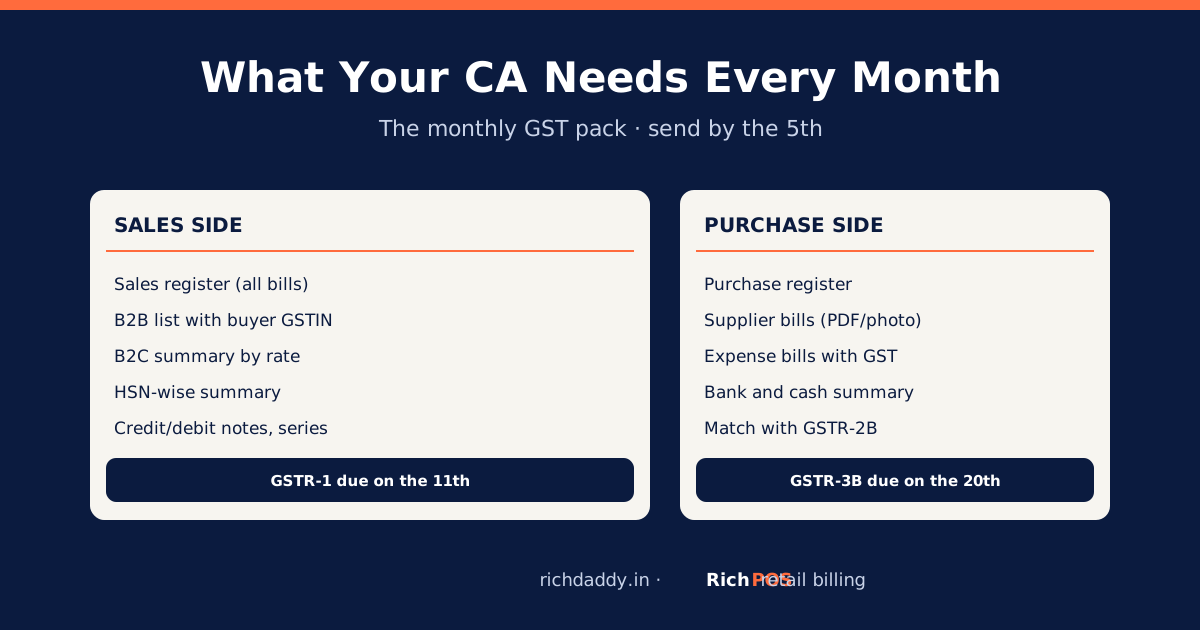
Every month, send your CA eight things: the sales register (all bills), a list of B2B sales with each buyer's GSTIN, the HSN-wise sales summary, credit and debit notes, the invoice number ranges used and cancelled, the purchase register with supplier GSTINs plus the supplier bills, your expense bills that carry GST, and the bank and cash summary. Send them in the first week of the month, because GSTR-1 is due on the 11th and GSTR-3B on the 20th for monthly filers.

Most late fees and mismatches start with missing paper, not with the CA. If the monthly pack is complete and arrives early, the returns take minutes. Here is the checklist, why your CA needs each item, and how to get it out of your billing software in one go.

The monthly GST pack: what to send and why

#What to sendWhy the CA needs it
1Sales register: every bill with date, number, value and GSTBase for GSTR-1 and the output tax in GSTR-3B
2B2B sales list with buyer GSTIN, invoice number, value and taxGSTR-1 reports B2B invoices one by one so buyers get input tax credit
3B2C sales summary by tax rate (and by state for sales to other states)B2C sales go into GSTR-1 as totals
4HSN-wise summary of salesGSTR-1 has an HSN summary table
5Credit and debit notes issued (returns, price changes)They adjust the month's tax; reported in GSTR-1
6Invoice series used: first and last number, and cancelled billsGSTR-1 document summary
7Purchase register with supplier GSTIN, invoice number and tax, plus copies of supplier billsInput tax credit, matched against your GSTR-2B
8Expense bills with GST (rent, electricity where applicable, repairs, transport) and the bank and cash summaryExtra credit where allowed, and to tie payments to tax

What GSTR-1 and GSTR-3B contain is explained in GSTR-1 vs GSTR-3B. How credit is matched: GSTR-2B reconciliation.

Monthly timeline for a shop filing monthly

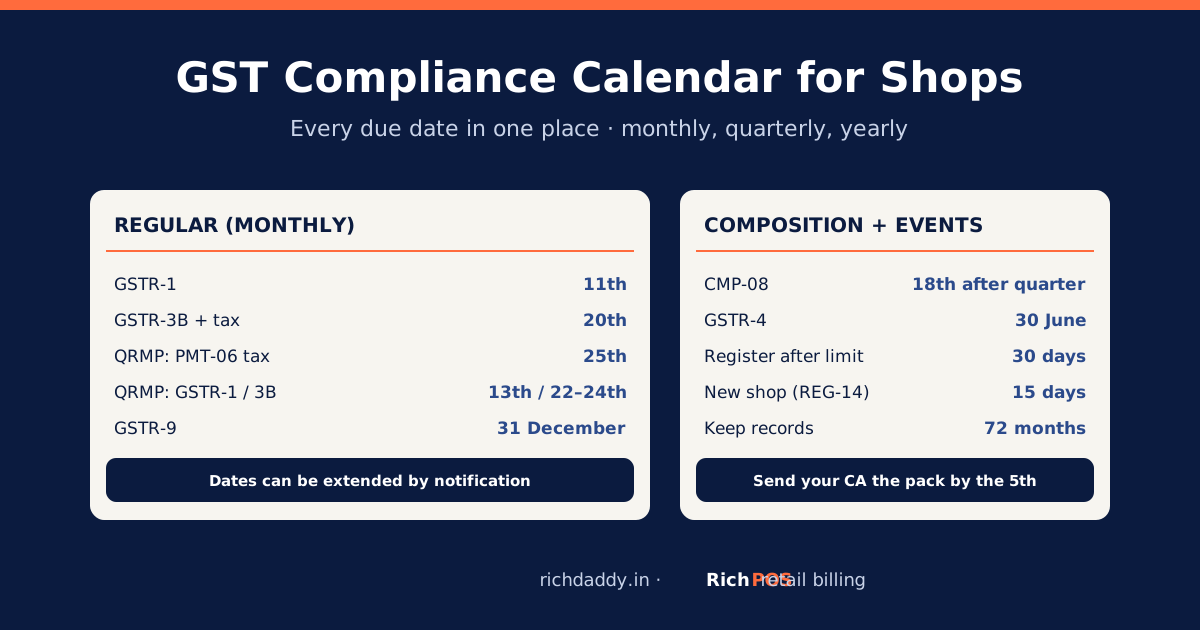
WhenWhat happens
Last day of the monthClose the day as usual; enter any pending purchase bills
1st to 5thExport the reports and send the pack to the CA
By the 11thCA files GSTR-1 (sales)
After GSTR-2B is availableCA matches supplier bills; you chase suppliers whose bills are missing
By the 20thCA files GSTR-3B; you pay the net tax

Shops with turnover up to ₹5 crore can choose the quarterly QRMP scheme, which changes the return dates but still needs monthly tax payment. Composition shops file CMP-08 every quarter instead. Late GSTR-3B costs a per-day late fee plus 18% interest on late tax: see GSTR-3B late fee and interest.
Five things that make CAs call you back

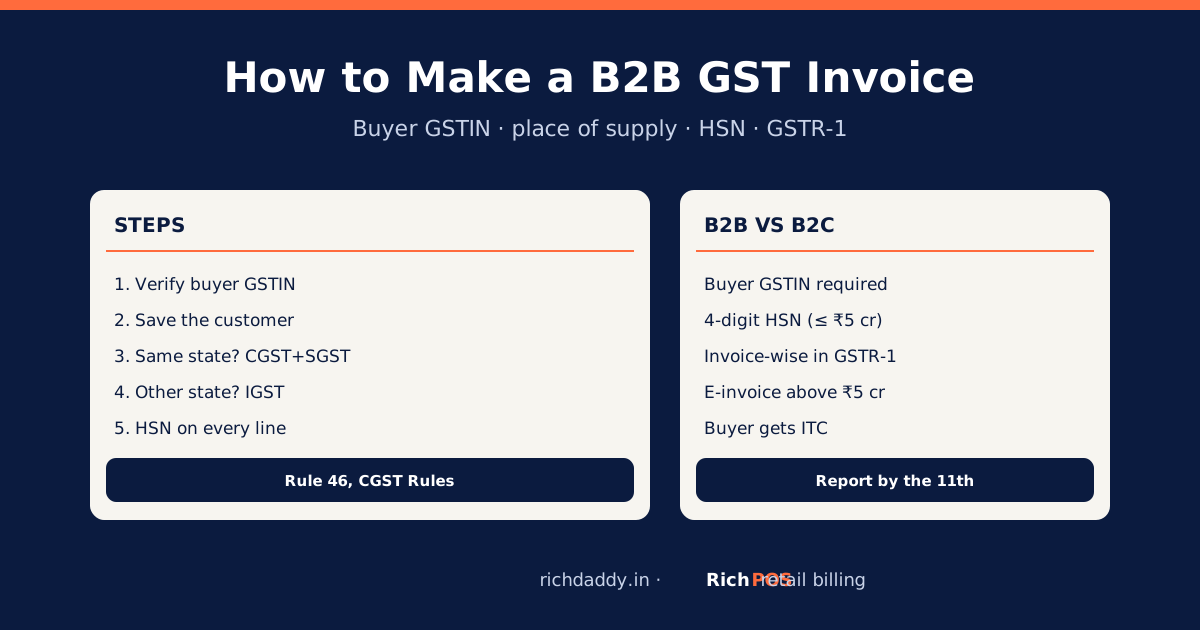
  • B2B sales without the buyer's GSTIN. The buyer loses credit and asks for a corrected bill. Save the GSTIN on the customer before billing.
  • Purchase bills arriving late. A supplier bill not entered this month is credit claimed late, or missed. Enter purchases the day they arrive.
  • Returns done by deleting bills. Deleting breaks the series and the sales total. Issue a credit note instead.
  • Wrong GST rate on items. Many rates changed on 22 September 2025; check items against the HSN and GST rate list.
  • Sales in two places. A notebook plus software, or two apps, means the CA has to merge them. Bill everything in one system.

Getting the pack out of billing software

  1. Export the GSTR-1 sales report for the month. In RichPOS it splits B2B, B2C and credit notes, with GST computed after bill discounts.
  2. Export the sales and purchase GST reports by HSN/SAC.
  3. Export the purchase register; attach supplier bill photos or PDFs.
  4. Export the expense report and the cash and bank summary.
  5. If your CA keeps books in Tally, send the Tally export (XML or CSV) as well; see Tally export.

Every RichPOS report exports to Excel, CSV or PDF. RichPOS prepares the data; it does not file returns on the GST portal or generate e-invoices, so your CA still files. See GST billing software.

Bottom line

A complete monthly pack sent by the 5th, with clean B2B GSTINs and every purchase entered, removes most GST stress. Billing software turns it into a few exports: start the RichPOS free trial or see pricing.

FAQ

Frequently asked questions

What documents does a CA need for GST return filing every month?
The sales register, a B2B sales list with buyer GSTINs, a B2C summary by rate, an HSN-wise summary, credit and debit notes, the invoice number ranges used and cancelled, the purchase register with supplier bills, expense bills with GST, and a bank and cash summary.
When should I send GST data to my CA?
In the first week of the following month. For monthly filers, GSTR-1 is due on the 11th and GSTR-3B on the 20th, and your CA also needs time to match supplier bills against GSTR-2B.
Why does my CA ask for the buyer's GSTIN?
B2B sales are reported invoice by invoice with the buyer's GSTIN in GSTR-1. That is how the buyer's GSTR-2B shows the credit. Without the GSTIN the sale is treated as B2C and the buyer loses the credit.
What is an HSN summary in GST returns?
A table in GSTR-1 showing your sales grouped by HSN code, with quantity, taxable value and tax. Billing software that stores HSN on each item produces it automatically.
Does RichPOS file GST returns directly?
RichPOS does not file returns. It produces the GSTR-1 sales report, HSN-wise GST reports and a Tally export for your CA, who files on the GST portal.
Built for thisGST billing software →Every GST field on the bill and GST reports by HSN for your CA.

Need a quick figure? Use the free GST calculator to add or remove GST.

Written by Ashok Sachdev

Founder, RichPOS Software, Ahmedabad. We build RichPOS for Indian shops and write these guides from what shop owners ask us every day. Facts on tax rates and prices are dated; confirm GST matters with your CA. Questions? WhatsApp us.

Make GST bills in seconds with RichPOS

Billing, stock, WhatsApp bills and GST reports in one app. Free 30-day trial with no card, then ₹99/month for 3 months and ₹199/month after.