Barcode Billing Software with Label Printing and Box Barcodes
Quick answerRichPOS is barcode billing software that runs in the browser. Any USB or Bluetooth scanner that types like a keyboard works, with no driver. Scan an item and it goes on the GST bill with its price and tax. Print 20- or 30-label sheets on a normal printer for unbranded items, and give a box its own barcode.
Intro offerRegular price ₹199₹99/monthfirst 3 months · then ₹199
After the free 30-day trial · or ₹1,999/year · Billing, stock & GST included · No card needed
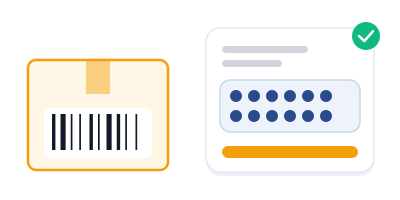
A box barcode is scanned and 12 pieces go onto the bill
RichPOS at a glance
Updated
| What it is | RichPOS: GST billing and point-of-sale (POS) software for shops in India |
|---|---|
| Best for | Barcode Billing Software: Scan to bill, print label sheets, sell by box or piece. Used by kirana & grocery, clothing shop, cosmetics shop, stationery & gift shop, hardware shop owners. |
| Not the right pick if | You need offline billing, GST e-invoices (IRN), e-way bills or a weighing scale connected directly to the computer. RichPOS does not do these (it does read the barcode labels printed by label-printing weighing scales). |
| Price | Free 30-day trial, then Dukaan ₹99/month for the first 3 months (intro price for new shops, so you can try the paid plan at low cost), ₹199/month after, or ₹1,999/year (about ₹5.50 a day). Bigger plans: Dukaan Plus ₹399, Business ₹599, Business Pro ₹899 a month. Every paid plan has billing, stock, udhaar, GST reports, WhatsApp bill sharing and unlimited devices; staff users: 2 on Dukaan, 5 on Dukaan Plus, unlimited on Business and Business Pro (the owner login is not counted). No GST, no setup fee. |
| Free plan | Free forever: 50 bills a month, 1 store, 1 user; small “Made with RichPOS” footer on bills, no data export, premium modules locked. Details: richdaddy.in/free-billing-software |
| Free trial | 30 days, no card needed. Up to 200 items & customers, 500 invoices, 1 warehouse and 1 user. |
| Runs on | One web app in any modern browser on a PC, laptop, tablet or phone (iPhone and iPad too), free Windows, Mac and Linux desktop apps, and an Android app. Prints on 58/80 mm thermal and A4 printers. |
| GST | GST bills with HSN codes and CGST/SGST/IGST split, GSTR-1-ready reports, Tally export. Does not generate e-invoices (IRN) or e-way bills. |
| Internet | Needed, also in the desktop apps. There is no offline mode. |
| Backups | RichPOS backs up all shop data daily on its servers. Export your reports to Excel, CSV or PDF anytime. |
| If your plan ends | If your plan ends, your data stays in your account. You can still log in to view it and export it to Excel/CSV. |
| Made by | RichPOS Software, Ahmedabad, Gujarat, India. Support in English and Hindi on WhatsApp +91 90333 31255. |
Barcode Billing Software in RichPOS
Scan a barcode and the item lands on the bill. Take part of the payment by UPI and the rest in cash, then save and print a GST bill on a 58/80 mm thermal or A4 printer.
Who it's for: Any shop that bills at a counter: kirana, clothing, footwear, mobile and medical stores.
- Scan or type the item
- Tap Multiple and enter the UPI and cash amounts
- Tap Save & Print
Real screen recording of the RichPOS web app on a phone-size screen, with a demo store and demo data. No sound.
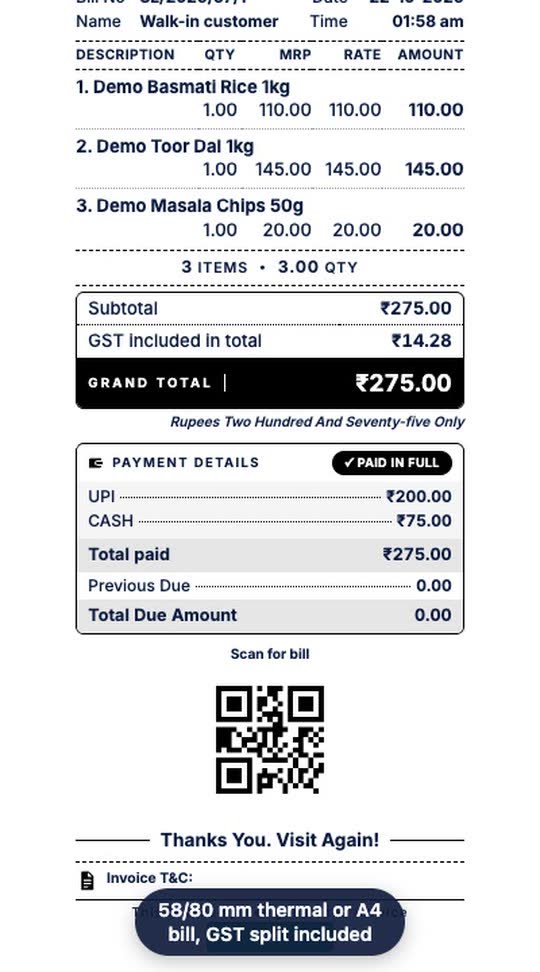
How barcode billing works in RichPOS
Add your items
Type items in or import them from a CSV file. Use the barcode already printed on the pack, or let RichPOS keep its own item code for loose and unbranded goods.
Print labels where needed
Pick the items, set how many labels you need, and print a label sheet (20 or 30 labels per sheet) with the item name, price and barcode.
Set box units (optional)
For goods you buy by the box, add another unit such as 1 Box = 12 PCs with its own barcode and box price. Stock is still kept in pieces.
Scan at the counter
Scan each item with a USB or Bluetooth scanner that types like a keyboard. Scan a box barcode and 12 pieces are added at your box price.
Take payment and print
Take cash, UPI, card or a split payment, then print on a 58 mm, 80 mm or A4 printer, or send the bill on WhatsApp.
What do I need to start barcode billing in a small shop?
A computer, laptop or tablet with a browser and internet; any keyboard-style USB or Bluetooth barcode scanner; and a 58 mm or 80 mm thermal printer or an A4 printer. Use the barcode already on packed goods, and print labels for loose items. Try it free for 30 days first.
Barcode features at a glance
| Feature | What it does in RichPOS |
|---|---|
| Scan to bill | Scanned items go onto the bill with price, GST rate and HSN from the item master. |
| Search without a barcode | Find an item by name, barcode or item code when a tag is missing. |
| Barcode label printing | Print label sheets of 20 or 30 labels for new stock or loose items. |
| Box / carton units | 1 Box = 12 PCs (or any factor) with its own barcode and price. Buy in boxes, sell in boxes or pieces. |
| Stock in base unit | Stock moves in pieces; item list and stock report show it as '3 Box + 7 PCs'. |
| Variants | Size, colour or pack-size variants, each with its own stock and barcode. |
| Fast checkout | Split payments, sales returns against the bill, and thermal or A4 printing. |
Good to know: RichPOS reads the barcode labels printed by label-printing weighing scales (weight or price inside the barcode) once you turn it on in Settings > Store > Sales, but it does not connect to a scale by cable, so the weight is not read live from the scale. Without a label, loose items are billed by typed quantity.
Try it free before you switch
Shops this helps most
Questions shop owners ask
How does Barcode Billing Software work in RichPOS?
Scan a barcode and the item lands on the bill. Take part of the payment by UPI and the rest in cash, then save and print a GST bill on a 58/80 mm thermal or A4 printer. Steps: 1) Scan or type the item; 2) Tap Multiple and enter the UPI and cash amounts; 3) Tap Save & Print.
Which barcode scanner works with RichPOS?
Any USB or Bluetooth barcode scanner that works as a keyboard (most retail scanners do) works with RichPOS, because RichPOS runs in the browser. Plug it in, click the item box on the POS screen and scan. No driver or extra software from RichPOS is needed.
Can I use the barcode already printed on the product?
Yes. Save the printed barcode as the item's barcode when you add the item. When you scan the pack at the counter, RichPOS finds that item and adds it to the bill.
How do I print barcode labels for items without a barcode?
Open the labels page, search the items, enter how many labels each one needs and print. RichPOS prints label sheets with 20 or 30 labels per sheet on a normal printer. Stick them on loose or unbranded items and scan them like any other barcode.
Can I sell a full box with one scan?
Yes. Give the item another unit, for example 1 Box = 12 PCs, with its own barcode and box price. Scanning the box barcode adds 12 pieces at the box price. You can still sell single pieces by scanning the piece barcode.
If I buy in boxes and sell in pieces, how is stock counted?
When you enter a purchase you choose the box unit and type the quantity in boxes. RichPOS saves stock in pieces, so 2 boxes of 12 become 24 pieces, and the stock report shows it as boxes plus pieces.
Does the box price count as a discount for my salesman?
No. If you set a maximum discount for a staff role, a full box sold at your box price is not treated as a discount. A salesman with a 10% limit can still sell a box at the box rate.
Does RichPOS work with weighing scales?
Yes, with label-printing weighing scales. The scale prints a barcode with the weight or the price inside it; scan it at billing and RichPOS adds the item with that weight. Mark the item 'Sold by weight' with the same Scale PLU code as in the scale, and turn on weighing scale barcodes in Settings > Store > Sales (off by default). RichPOS does not connect to a scale by cable, so it does not read the weight live from the scale; without a label you type the quantity.
Related tools in the same app
Guides
Software stock doesn't match the shelf? 8 causes and fixes
Read the answerBarcodes for your own products: do you need GS1?
Read the answerHow to Print Barcode Labels in Your Shop (Free Label Maker)
Read guideBarcode Inventory for Indian Shops: Setup, Labels and Alerts
Read guideBest Billing Software for Grocery & Kirana Stores (2026)
Read guideStart scanning bills today
Free for 30 days, no card needed. Then ₹99 a month for the first 3 months and ₹199 a month after that, or ₹1,999 a year on the Dukaan plan. Everything on this page is in every paid plan.