Barcodes speed up billing only if every item on the shelf has one that scans first time. Many shop items, like loose dry fruits, repacked spices, garments from local makers or accessories without packaging, arrive with no barcode at all. The fix is printing your own labels. This guide covers which barcode type to use, label sizes, printers, what to print on each label and the mistakes that stop scanners reading them.
Quick answer
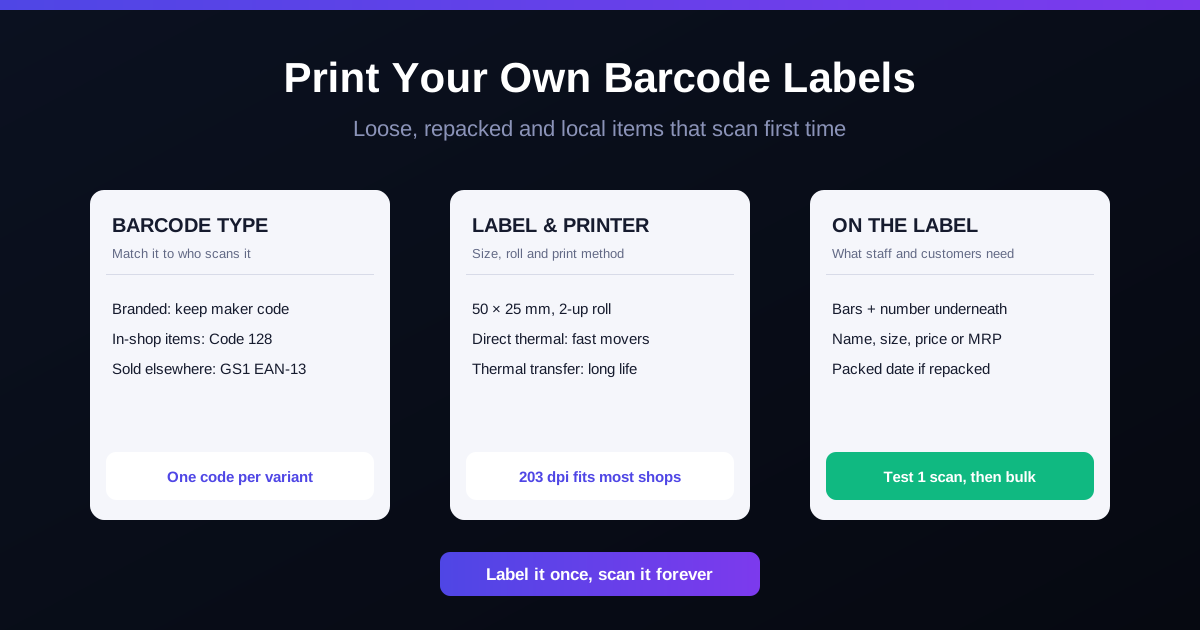
Keep the manufacturer's barcode on branded goods. For everything else, create the item in your billing software, let it generate an internal barcode (Code 128 is a safe choice), and print labels on a thermal label printer, commonly 50 × 25 mm. Print the item name, price and barcode number under the bars, test a scan before bulk printing, and stick the label on a flat surface. You need GS1 India EAN-13 codes only if your products will be sold by other retailers or marketplaces.
Step 1: Decide which items need your own label
| Item type | What to do |
|---|---|
| Branded packaged goods with a barcode | Scan and link the existing barcode to the item. Do not cover it. |
| Loose or repacked goods (dry fruits, spices, sweets) | Print an internal barcode label for each pack size. |
| Garments and footwear from local makers | Print a tag per size and colour. See managing size and colour variants. |
| Your own brand sold in other shops or online | Get EAN-13 numbers from GS1 India and print those. |
Step 2: Choose the barcode type
- EAN-13: the 13-digit retail barcode on most packaged goods in India. Registered numbers come from GS1 India. Needed when other retailers must scan your product.
- Code 128: compact, holds letters and numbers, read by nearly every scanner. A good default for internal shop codes.
- QR codes: useful for links and UPI, but many older 1D laser scanners at billing counters cannot read them. Keep a 1D barcode for billing.
Step 3: Pick label size and printer
| Choice | Common options | Suits |
|---|---|---|
| Label size | 50 × 25 mm, 38 × 25 mm, narrow jewellery tags | Most shelf items; small items; rings and chains |
| Roll layout | 1-up or 2-up (two labels side by side) | 2-up prints faster for large batches |
| Print method | Direct thermal (no ribbon) or thermal transfer (ribbon) | Fast movers; long-life or stored stock |
| Resolution | 203 dpi or 300 dpi | 203 dpi is fine for most; 300 dpi for very small labels |
Printing on A4 sticker sheets with a laser printer is fine for a few dozen labels. If you label new stock every week, a thermal label printer pays for itself in time and wasted sheets. Receipt printers are a separate choice; see thermal vs A4 invoices.
Step 4: Decide what goes on the label
- Barcode with the number printed underneath, so staff can type it if a scan fails.
- Short item name and size or colour where relevant.
- Selling price, or MRP for packaged goods. The MRP must include all taxes.
- Packed or expiry date for food items, if you repack.
If you pack goods yourself for sale, the Legal Metrology packaged commodity rules also require declarations such as the packer's name and address, net quantity, MRP and date of packing. Check which apply to your products with a consultant or your local Legal Metrology office.
A worked example: a dry fruit shop in Lucknow
A dry fruit shop in Lucknow repacks almonds, cashews and raisins into 250 g and 500 g packs, six products in total. It creates each pack size as a separate item in the billing software, with its own internal barcode and price. Every Monday it prints labels for the week's packing, about 300 labels, on a 2-up roll of 50 × 25 mm direct thermal labels. At the counter, each pack scans in a second instead of the cashier searching "kaju 500" and picking the wrong pack size. The shop and figures are illustrative.
Common mistakes that stop scans
- Bars too small or squashed. Shrinking a barcode to fit a tiny label makes it unreadable. Use a bigger label or a shorter code.
- No white space at the ends. Barcodes need a clear margin (the quiet zone) on both sides.
- Labels on curves or folds. Stick them on a flat panel, not round a bottle neck or across a seam.
- Faded direct thermal labels on stock kept near a window or in a hot godown.
- Covering the maker's barcode with your own label, so two codes point to different items.
- Not testing first. Print one label and scan it before printing a whole roll.
For how barcodes fit into stock control more broadly, see barcode inventory management.
How RichPOS helps
- Barcode label design and bulk printing straight from the app, for anything you stock. See Inventory & Barcode.
- Variants by size, colour and unit, so each one gets its own label.
- Barcode and keyboard-driven checkout so labelled items bill in seconds. See Billing & POS.
- Stock adjustments logged with reason and user, and low-stock alerts before fast movers run out.
RichPOS costs ₹199/month (₹2,000/year) with a 30-day free trial. See pricing.
Frequently asked questions
- Do I need GS1 barcodes for my shop?
- Only if you make or pack products that will be sold in other shops, on marketplaces or in large retail chains, which usually ask for a registered EAN-13 code from GS1 India. For loose, repacked or unbranded items sold only in your own shop, an internal barcode generated by your billing software is enough, because only your scanners need to read it.
- Which barcode type should I use for in-house labels?
- Code 128 is a good default for internal labels. It holds letters and numbers, prints compactly and is read by almost every scanner. Use EAN-13 only when you have GS1-issued numbers, and keep the manufacturer's existing barcode on branded goods rather than covering it.
- What size barcode label is most common?
- For shelf items, 50 × 25 mm and 38 × 25 mm labels are widely used, often on 2-up rolls for faster printing. Jewellery and small items use narrow tag labels. Pick a size your printer supports and check the barcode still scans at that width before buying a large stock of rolls.
- Direct thermal or thermal transfer labels?
- Direct thermal labels need no ribbon and are cheaper, but they fade with heat and sunlight, so they suit fast-moving stock. Thermal transfer uses a ribbon and lasts much longer, which suits slow-moving, stored or outdoor items.
- Can I print barcode labels on a normal A4 printer?
- Yes, on A4 sticker sheets with a laser printer, which works for small batches. For daily printing, a dedicated thermal label printer is faster, cheaper per label and gives sharper bars that scan more reliably.
Bottom line: keep maker barcodes, print your own for everything else, use a thermal label printer, and test one label before printing a roll. Want label printing built into your billing? Call +91 90333 31255 for a demo, or start the 30-day free trial from the pricing page.
This is general guidance, not legal advice. Labelling and Legal Metrology requirements depend on your products and can change; confirm with a consultant for your business.