A kurta style that comes in five sizes and four colours is not one item. It is twenty. A sneaker in six sizes and three colours is eighteen. Garment and footwear shops that track stock only by style soon find the shelf full of the wrong sizes, while customers walk out because size 9 or XL is gone. This guide covers how shops in Surat, Ludhiana, Jaipur, Kolkata or anywhere in India can manage size and colour variants without drowning in SKUs.
Quick answer
Create each style once and add every size-colour combination as a variant with its own stock and barcode. Bill by scanning, check stock by variant every week, reorder the sizes that sell out, and cut orders for sizes that do not move. Also watch the ₹2,500 per piece GST threshold, because different sizes of one style can land on different rates.
Why style-level stock misleads you
Say you bought 40 pieces of a cotton kurta and 22 are left. Style-level stock says you are fine. Variant-level stock may say M and L in blue are sold out, while XS and XXL in maroon make up most of what is left. The customer who wants a blue M leaves, and the 22 pieces on the shelf are the ones nobody asked for. That gap is lost sales on one side and blocked cash on the other.
Setting up variants the right way
1. One product, many variants
Create the style (for example, "Cotton kurta, straight cut") once, then add size and colour as variants. Price, cost and HSN usually stay the same for the style, but stock and barcode belong to each variant.
2. Keep a fixed size list per category
Use one size list for shirts (S, M, L, XL, XXL), one for trousers (28 to 40), one for footwear (UK 5 to 11) and one for kidswear (by age). Mixed labels like "Large", "L" and "40" for the same fit make reports useless.
3. Name colours consistently
Pick one name per colour and stick to it. "Navy", "Dark blue" and "Blue-D" for the same shade become three different variants in your stock report.
4. Barcode every variant
Print a label for each size-colour combination when stock arrives, so the cashier scans instead of choosing a size from a list. Our barcode inventory guide covers printers and label basics.
Reading your size-colour stock
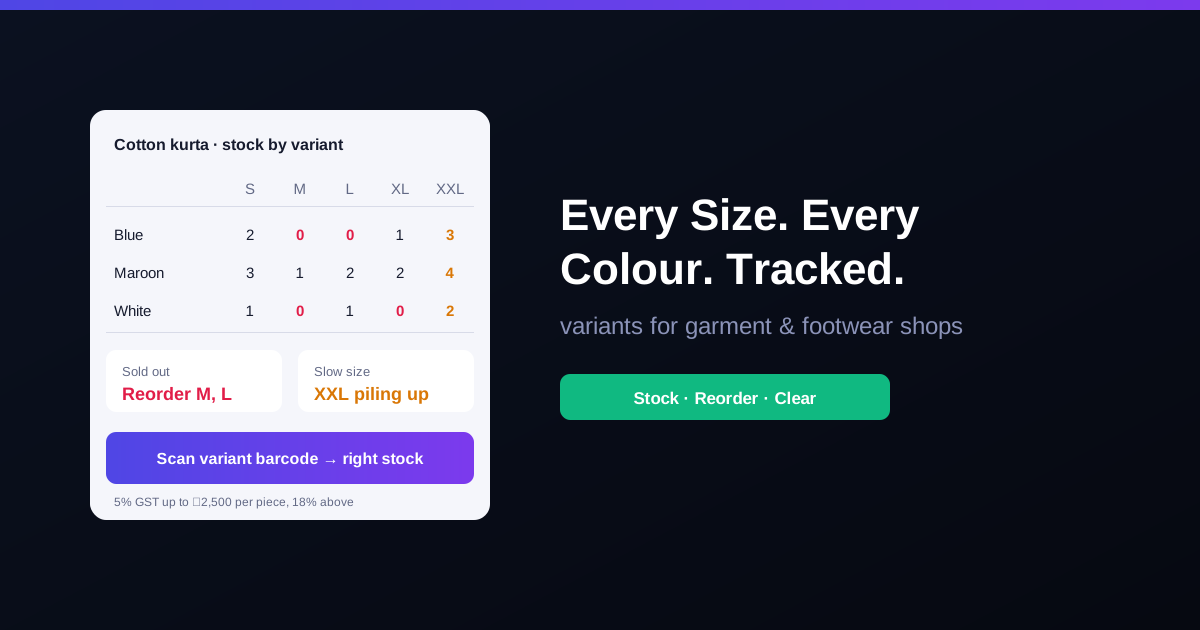
Lay out stock per style as a grid, sizes across and colours down. A simple example for one kurta style after three weeks:
| Colour | S | M | L | XL | XXL |
|---|---|---|---|---|---|
| Blue | 2 | 0 | 0 | 1 | 3 |
| Maroon | 3 | 1 | 2 | 2 | 4 |
| White | 1 | 0 | 1 | 0 | 2 |
What this tells you: M and L sell fastest, blue and white move quicker than maroon, and XXL is building up in every colour. The reorder is blue and white in M and L, not "20 more kurtas".
Dead sizes and how to handle them
- Spot them early. A size that has not sold in four to six weeks while its neighbours sold out is a dead size for that style.
- Buy by your own size curve. If your shop sells M and L three times faster than S and XXL, order in that ratio instead of the supplier's standard set.
- Clear before the season ends. A discount on end sizes in the last weeks of a season beats carrying them for a year.
- Move stock between branches. A size that is dead in one store may sell in another. See managing multiple stores.
GST: when sizes cross ₹2,500
From 22 September 2025, readymade garments and footwear are taxed at 5% up to ₹2,500 per piece or pair and 18% above it. Sizes within one style are sometimes priced differently. If a blazer sells at ₹2,399 in sizes 38 to 42 and ₹2,699 in 44 and 46, the larger sizes are billed at 18% and the smaller ones at 5%. Set the price and rate per variant so the invoice picks the right one. Details are in our guides to GST on clothes and GST on footwear. Confirm your classification with your CA.
Exchanges: the size swap problem
In garment and footwear shops, most returns are size exchanges. Scan the returned variant back in and bill the new one out, so both stock counts stay correct. Swapping the piece at the counter without recording it is how "system says 2, shelf has 0" happens. Our returns and refunds guide covers the process, and a periodic stock audit catches what slips through.
How RichPOS handles variants
RichPOS inventory & barcode supports unlimited items, categories, brands and variants such as size, colour and unit, with barcode label design and bulk printing when stock arrives. Low-stock alerts warn you before a fast size runs out, and every stock adjustment is logged with a reason and user. At the counter, billing & POS scans the variant barcode, takes cash, card, UPI or split payments, and handles returns that write back to stock. GST and business reports come from live data.
Frequently asked questions
- Should each size and colour be a separate item in billing software?
- Treat them as variants of one product, with each size-colour combination carrying its own stock and barcode. You get stock per variant for reordering, while reports can still show the style as a whole.
- What is a dead size?
- A dead size is a size of a style that keeps sitting on the shelf while other sizes sell out, often the extreme sizes such as XS or XXXL, or shoe size 5 and 11. Tracking stock per variant shows them early so you can buy fewer next time or clear them with a discount.
- Can two sizes of the same garment attract different GST rates?
- Yes. Since 22 September 2025, readymade garments and footwear are taxed at 5% up to ₹2,500 per piece or pair and 18% above it. If a larger size is priced above ₹2,500 while smaller sizes are below, the larger size is billed at 18%. Confirm classification with your CA.
- Do I need a barcode on every size and colour?
- It is the easiest way to avoid billing the wrong variant. A generic style barcode forces the cashier to choose the size by hand, which is where most variant stock mismatches start.
Bottom line: in a garment or footwear shop, the size and colour is the item. Track stock per variant, barcode every piece, reorder by what sells, and clear dead sizes before the season ends. RichPOS gives you variant stock with GST billing from ₹199/month, with a 30-day free trial. See pricing or call +91 90333 31255.
General guidance for Indian retailers as of 2026; GST rates and thresholds may change, so confirm them for your products with your CA.