Multiple GST Rates in One Invoice: How to Bill Mixed-Rate Items
Yes, one GST invoice can carry 0%, 5% and 18% items. Tax each line at its own rate, show a rate-wise summary, split bill discounts consistently, and note that a combo sold for one price is a mixed supply taxed at the highest rate. Worked kirana example and Excel SUMIF steps.
Ek bill mein 0%, 5%, 18% wale items? RichBills har item ka HSN aur GST rate yaad rakhta hai aur bill par rate-wise GST breakup khud print karta hai.30 din free try karo →
Yes, one GST invoice can carry items at different GST rates. Rule 46 asks the invoice to show, for the goods on it, the HSN code, description, quantity, taxable value, rate of tax and amount of tax, so each line carries its own rate. Work out tax line by line, then total the taxable value and tax for each rate (0%, 5%, 18%) at the bottom. The one exception: if you sell several items together for a single price (a combo or hamper), that is a "mixed supply" and the whole price is taxed at the highest rate in it.
A kirana customer buys vegetables, packed oil and a floor cleaner. One customer, one bill, three different GST rates.
Seedhi baat: alag-alag rate ke items ke liye alag bill banane ki zaroorat nahi hai. Ek hi bill mein har line par uska apna rate lagao, aur neeche rate-wise total dikhao.
Can one invoice have different GST rates?
Yes. Rule 46 of the CGST Rules lists what a tax invoice must contain, and several particulars are about each item:
Rule 46 clause
What it asks for
On a mixed-rate bill
(g)
HSN code for goods or services
Per item
(h)
Description of goods or services
Per item
(i)
Quantity and unit
Per item
(k)
Taxable value "taking into account discount or abatement, if any"
Per item, after discount
(l)
Rate of tax (central tax, State tax, integrated tax, Union territory tax or cess)
Get the taxable value of each line. Qty × price, minus any discount given on that line.
Tax per line. Taxable value × rate. If your shelf price already includes GST, back it out first: taxable value = MRP × 100 ÷ (100 + rate). See the reverse GST formula.
Split the tax. Same-state sale: half CGST, half SGST (5% = 2.5% + 2.5%; 18% = 9% + 9%). Sale to another state: full rate as IGST. Details in intra-state vs inter-state GST.
Total per rate. Add up taxable value and tax for all 5% lines, all 18% lines, and so on.
Grand total and round off. Taxable value + all tax, then round the payable amount if you want.
Worked example: a kirana bill with 0%, 5% and 18% items (illustrative)
Sharma General Store, Pune (GST registered), bills a walk-in local customer, so CGST + SGST apply. Items, prices and rates are illustrative only; check the HSN and current rate of each product you sell.
Item
Qty × price
Taxable value
GST rate (assumed)
CGST
SGST
Line total
Fresh vegetables
2 kg × ₹40
₹80.00
0%
₹0.00
₹0.00
₹80.00
Packed edible oil 1 L
2 × ₹150
₹300.00
5%
₹7.50
₹7.50
₹315.00
Biscuits
4 × ₹24.50
₹98.00
5%
₹2.45
₹2.45
₹102.90
Floor cleaner 1 L
1 × ₹180
₹180.00
18%
₹16.20
₹16.20
₹212.40
Room freshener
1 × ₹220
₹220.00
18%
₹19.80
₹19.80
₹259.60
Rate-wise GST summary (printed below the items):
GST rate
Taxable value
CGST
SGST
Total tax
0%
₹80.00
₹0.00
₹0.00
₹0.00
5%
₹398.00
₹9.95
₹9.95
₹19.90
18%
₹400.00
₹36.00
₹36.00
₹72.00
Total
₹878.00
₹45.95
₹45.95
₹91.90
Bill total: ₹878.00 + ₹91.90 = ₹969.90. Round off +₹0.10. Amount payable: ₹970.
For a buyer in another state, the same bill would show IGST 5% = ₹19.90 and IGST 18% = ₹72.00 instead of the CGST/SGST split.
Discounts on a mixed-rate bill
Section 15(3)(a) of the CGST Act says the value of supply does not include a discount given before or at the time of supply "if such discount has been duly recorded in the invoice". Rule 46(k) also asks for taxable value "taking into account discount". So a discount shown on the bill reduces the taxable value, and the tax falls with it. A discount given later needs a credit note, with the conditions in section 15(3)(b). The basics are in GST on discounts on an invoice.
On a mixed-rate bill the question is: which rate's value does the discount reduce?
Item-level discount (₹10 off the oil): reduce that line's taxable value and tax it at that line's rate.
Bill-level discount ("₹50 off the bill"): it has to be spread across the lines. A common method is pro-rata to each rate group's taxable value.
Pro-rata example (illustrative, same bill, ₹50 off):
GST rate
Taxable before
Share of ₹50
Taxable after
Tax after
0%
₹80.00
₹4.56
₹75.44
₹0.00
5%
₹398.00
₹22.67
₹375.33
₹18.76
18%
₹400.00
₹22.77
₹377.23
₹67.90
Total
₹878.00
₹50.00
₹828.00
₹86.66
New total ₹828.00 + ₹86.66 = ₹914.66, rounded to ₹915. (The 18% share was adjusted by one paisa so the shares add up to exactly ₹50.)
Do not push the whole discount onto the 18% items just because that cuts the most tax. Use one method consistently and confirm it with your CA.
Rounding off a mixed-rate bill
Calculate tax per line to two decimals, total it per rate, and round only the final payable amount, shown as its own line ("Round off +0.10"). More in round off on a GST invoice.
Mixed supply vs composite supply: when one rate applies to the whole lot
Separately priced items on one bill are taxed at their own rates. The picture changes when you sell several things together for one price.
Mixed supply
Composite supply
Definition
Section 2(74): two or more individual supplies made together "for a single price" that are not a composite supply
Section 2(30): two or more supplies "naturally bundled" and supplied together in the ordinary course of business, one of which is a principal supply
Tax rate (section 8)
Rate of the item "which attracts the highest rate of tax"
Rate of the principal supply
The Act's own mixed-supply illustration is a package of canned foods, sweets, chocolates, dry fruits and drinks "supplied for a single price", and it adds: "It shall not be a mixed supply if these items are supplied separately." So:
A Diwali hamper of dry fruits, chocolates and a decorative item sold at ₹999 flat is one mixed supply, taxed at the highest rate inside. See GST on Diwali gifts and hampers.
The same items billed as separate lines, each with its own price, are separate supplies taxed at their own rates, even on one invoice.
A stationery "school kit" sold for one price raises the same question. To tax each item at its own rate, price and bill them separately.
Exempt and nil-rated items on the same bill
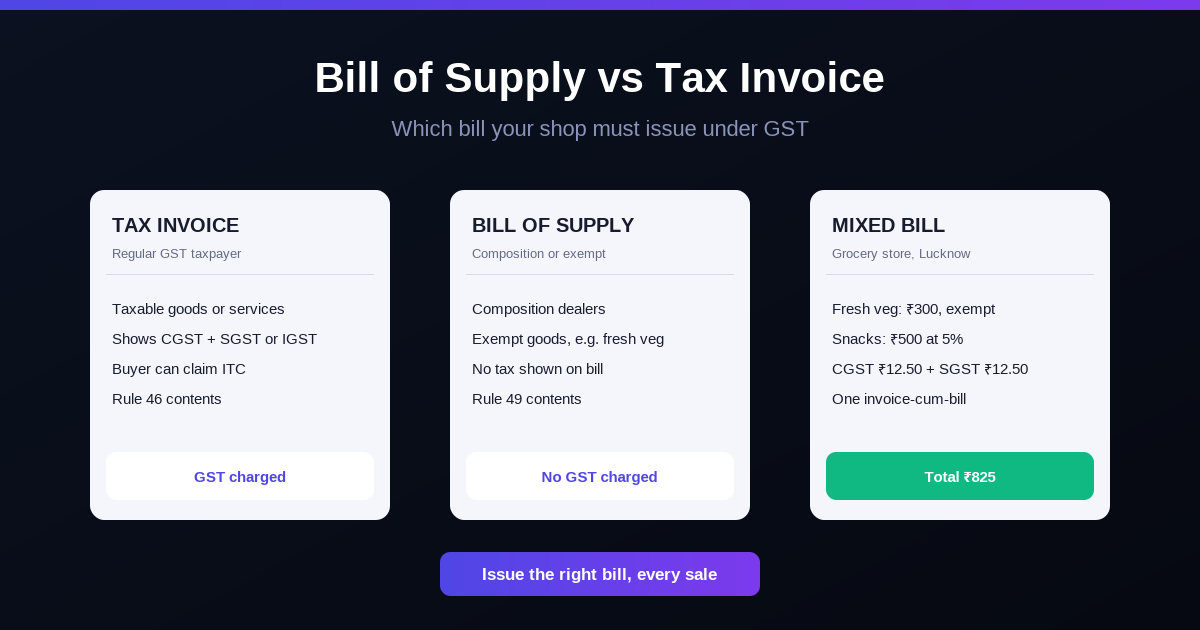
Normally a registered shop issues a tax invoice for taxable goods and a bill of supply for exempt goods (the difference is in bill of supply vs tax invoice). Rule 46A removes the need for two documents in one common case: where a registered person supplies "taxable as well as exempted goods or services or both to an unregistered person, a single 'invoice-cum-bill of supply' may be issued for all such supplies." That document must still carry the particulars of rule 46 (or rule 54) and rule 49.
So a walk-in customer buying vegetables and packed goods can get one combined bill. For a registered buyer, ask your CA. If you are unsure whether an item is nil-rated, exempt or non-GST, read nil-rated vs exempt vs zero-rated vs non-GST.
How many HSN digits to print
Notification 78/2020-Central Tax (in force from 1 April 2021) links the HSN digits on a tax invoice to aggregate turnover in the preceding financial year:
Aggregate turnover in the preceding financial year
HSN digits on the invoice
Up to ₹5 crore
4
More than ₹5 crore
6
Its proviso says a registered person with turnover up to ₹5 crore "may not mention" these HSN digits on tax invoices for supplies to unregistered persons. Printing HSN on every line still helps your CA with the HSN summary.
Mixed GST rates in Excel: a simple sheet
For bills in Excel (headings in row 1, items from row 2):
Type in A to D: Item, HSN, Qty, Price. Type the GST % in F as 0, 5 or 18.
E (Taxable value): =C2*D2
G (CGST) and H (SGST): =ROUND(E2*F2/200,2)
I (Line total): =E2+G2+H2
For the rate-wise summary, put the rates 0, 5, 18 in cells K2:K4 and use SUMIF:
Taxable value for the rate in K2: =SUMIF($F$2:$F$50,K2,$E$2:$E$50)
CGST for that rate: =SUMIF($F$2:$F$50,K2,$G$2:$G$50) (same for SGST with column H)
For an inter-state bill, replace G and H with one IGST column: =ROUND(E2*F2/100,2). Accounting software such as Tally works the same way: the GST rate sits on each stock item, so one sales voucher can mix rates.
Reporting mixed-rate sales in GSTR-1
A mixed-rate bill is one invoice, but in GSTR-1 its value is reported split by rate, and the HSN summary in Table 12 lists each HSN with its tax. See GSTR-1 HSN summary (Table 12) for B2B and B2C. That is why HSN and rate on each line matter more than the look of the bill.
Common mistakes and a quick checklist
One "average" or highest rate applied to every item on a separately priced bill. Check each item's HSN and current rate instead.
Separate bills for each rate when one bill would do.
A combo sold at one price but taxed item by item. A single-price combo is a mixed supply under section 8.
A bill-level discount with no record of how it was split across rates.
Tax rounded per line to whole rupees; round only the payable amount.
Old rates left in the item master after a rate change.
No rate-wise summary at the bottom, so nobody can check the tax.
How RichBills (formerly RichPOS) helps
In RichBills each item stores its own HSN code and GST rate, so when you scan or search items at the billing counter, every line gets its rate automatically, whether the bill has one rate or four. CGST + SGST is applied for same-state sales, and IGST is used automatically when the customer's GSTIN is from another state. The printed bill shows HSN per line and a rate-wise GST breakup (taxable value and tax per rate), on thermal or A4 paper, or as a PDF on WhatsApp. For a grocery counter, see billing software for kirana and grocery stores.
GST reports give GSTR-1-ready sales data you can export to Excel for your CA.
RichBills does not file GSTR-1 or any return, and does not decide your HSN codes or rates; you enter them on each item, and your CA should check them.
Pricing: 30 din free, phir ₹99/month pehle 3 mahine, phir ₹199/month ya ₹1,999/saal.
If you want to see a mixed-rate bill with its rate-wise summary on your own items, you can try it free for 30 days at app.richbills.in.
Bottom line: One invoice can carry 0%, 5% and 18% items together. Tax each line at its own rate (rule 46 asks for the rate and tax amount per item), split CGST/SGST or use IGST, and show a rate-wise total at the bottom. Spread any bill-level discount by a consistent method, round only the final amount, and remember that a combo sold for one price is a mixed supply taxed at the highest rate inside it.
General information based on the CGST Act, 2017, the CGST Rules, 2017 as published by CBIC and Notification 78/2020-Central Tax, as of November 2026. GST rates in the examples are assumed for illustration. Not tax/legal advice; confirm with your CA.
FAQ
Frequently asked questions
Can one invoice have different GST rates?
Yes. A single tax invoice can list items at 0%, 5%, 18% or any other rate. Rule 46 asks for the HSN, taxable value, rate of tax and amount of tax for the goods on the invoice, so each line shows its own rate.
How do you calculate GST when items have different rates in one bill?
Calculate tax on each line (taxable value × that item's rate), then total the taxable value and tax separately for each rate. Round only the final amount.
Do I need separate bills for 5% and 18% items?
No. One bill can carry items at different rates, with a rate-wise summary at the bottom.
What GST rate applies to a combo or hamper with mixed items?
If the items are sold together for a single price and are not naturally bundled, it is a mixed supply under section 2(74), and section 8 taxes the whole price at the highest rate among the items. Priced separately, each item keeps its own rate.
How is a bill-level discount split across different GST rates?
A common method is pro-rata, in proportion to each rate group's taxable value. The discount must be shown on the invoice to reduce the taxable value under section 15(3)(a). Confirm the method with your CA.
Can a tax invoice include exempt items too?
Yes, for sales to unregistered customers. Rule 46A lets a registered person issue a single "invoice-cum-bill of supply" covering both taxable and exempt goods supplied to an unregistered person.
How do I make a multiple GST rate invoice in Excel?
Keep columns for item, HSN, qty, price, taxable value, GST %, CGST, SGST and total. Then use SUMIF on the GST % column, for example =SUMIF($F$2:$F$50,5,$E$2:$E$50), to total taxable value for 5% items.
Founder, RichBills Software, Ahmedabad. We build RichBills for Indian shops and write these guides from what shop owners ask us every day. Facts on tax rates and prices are dated; confirm GST matters with your CA. Questions? WhatsApp us.
Make GST bills in seconds with RichBills
Ek bill mein 0%, 5%, 18% wale items? RichBills har item ka HSN aur GST rate yaad rakhta hai aur bill par rate-wise GST breakup khud print karta hai.
Billing, stock, WhatsApp bills and GST reports in one app. Free 30-day trial with no card, then ₹99/month for 3 months and ₹199/month after.
Backdated Invoice in GST: Time Limit to Issue a Bill in IndiaCan you backdate a GST invoice? What a backdated invoice means, the time limit for issuing a tax invoice for goods and services (section 31, rule 47), what to do if you forgot a bill, why old-dated bills out of sequence are a red flag, penalties, and the 30-day e-invoice limit.
Bill to Ship to in GST: Invoice, IGST and E-way Bill RulesBilled to one party, goods delivered to another? Place of supply is the bill-to party's state (IGST Act s.10(1)(b)), the invoice shows the delivery address (Rule 46), and only one e-way bill is needed. Worked example: Ahmedabad, Mumbai, Pune.