Gift Voucher and Credit Note Software for Your Shop
Quick answerIn RichPOS you sell a gift voucher for cash, UPI or card and print a slip with its code (like GV-7KQ2M) and a barcode. The customer gives the code on any later bill and the amount comes off. A sales return can be refunded as a credit note (CN-XXXXX) that is used the same way.
Intro offerRegular price ₹199₹99/monthfirst 3 months · then ₹199
After the free 30-day trial · or ₹1,999/year · Billing, stock & GST included · No card needed
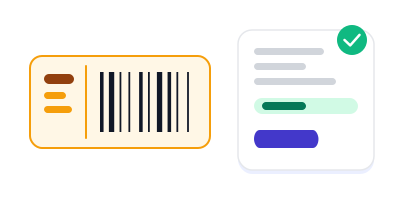
A gift voucher code is used on a bill and its amount comes off the total
RichPOS at a glance
Updated
| What it is | RichPOS: GST billing and point-of-sale (POS) software for shops in India |
|---|---|
| Best for | Gift Vouchers & Credit Notes: Sell gift vouchers, print a slip, redeem the code; refund returns as credit notes. Used by clothing shop, cosmetics shop, footwear shop, stationery & gift shop owners. |
| Not the right pick if | You need offline billing, GST e-invoices (IRN), e-way bills or a weighing scale connected directly to the computer. RichPOS does not do these (it does read the barcode labels printed by label-printing weighing scales). |
| Price | Free 30-day trial, then Dukaan ₹99/month for the first 3 months (intro price for new shops, so you can try the paid plan at low cost), ₹199/month after, or ₹1,999/year (about ₹5.50 a day). Bigger plans: Dukaan Plus ₹399, Business ₹599, Business Pro ₹899 a month. Every paid plan has billing, stock, udhaar, GST reports, WhatsApp bill sharing and unlimited devices; staff users: 2 on Dukaan, 5 on Dukaan Plus, unlimited on Business and Business Pro (the owner login is not counted). No GST, no setup fee. |
| Free plan | Free forever: 50 bills a month, 1 store, 1 user; small “Made with RichPOS” footer on bills, no data export, premium modules locked. Details: richdaddy.in/free-billing-software |
| Free trial | 30 days, no card needed. Up to 200 items & customers, 500 invoices, 1 warehouse and 1 user. |
| Runs on | One web app in any modern browser on a PC, laptop, tablet or phone (iPhone and iPad too), free Windows, Mac and Linux desktop apps, and an Android app. Prints on 58/80 mm thermal and A4 printers. |
| GST | GST bills with HSN codes and CGST/SGST/IGST split, GSTR-1-ready reports, Tally export. Does not generate e-invoices (IRN) or e-way bills. |
| Internet | Needed, also in the desktop apps. There is no offline mode. |
| Backups | RichPOS backs up all shop data daily on its servers. Export your reports to Excel, CSV or PDF anytime. |
| If your plan ends | If your plan ends, your data stays in your account. You can still log in to view it and export it to Excel/CSV. |
| Made by | RichPOS Software, Ahmedabad, Gujarat, India. Support in English and Hindi on WhatsApp +91 90333 31255. |
Gift Vouchers & Credit Notes in RichPOS
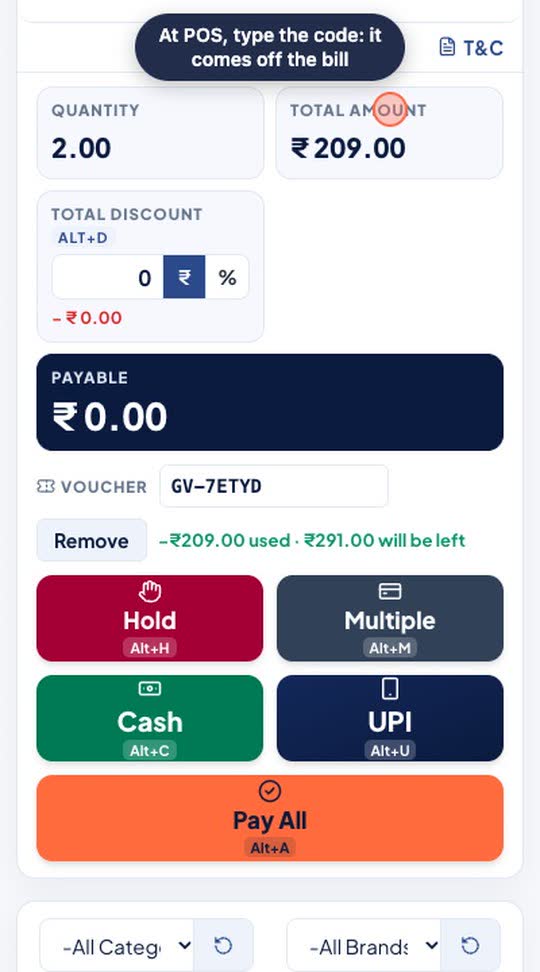
Issue a gift voucher for any amount and get a unique code. At POS, type the code and it comes off the bill; any unused balance stays on the voucher. Credit notes for returns work the same way.
Who it's for: Gift, clothing and stationery shops, and any shop that gives exchange slips instead of cash back.
- Marketing > Gift Vouchers: amount and payment mode
- Issue gift voucher
- At POS, type the code and tap Apply
Real screen recording of the RichPOS web app on a phone-size screen, with a demo store and demo data. No sound.
How gift vouchers and credit notes work
Issue a gift voucher
On the Vouchers page enter the amount, how the customer paid (cash, UPI or card) and, if you want, the customer and a valid-till date. Leave the date empty for no expiry.
Print the slip
Print a receipt-width slip with the code in large letters, a barcode of the code and the valid-till date (or 'No expiry').
Redeem on the next bill
At the counter, enter the code in the voucher box on the POS. RichPOS checks the balance and takes off up to that amount; whatever is left stays on the code.
Refund a return as a credit note
On a sales return, choose credit note as the refund mode. RichPOS issues a CN code to the customer, linked to the bill if you want, instead of giving cash back.
Track every code
Search by code, customer name or mobile. Each code shows Active, Used, Expired or Void, and the page shows active vouchers, the balance still to be used and the amount issued this month.
Voucher and credit note features
| Feature | What it does in RichPOS |
|---|---|
| Two kinds of code | Gift voucher (GV-XXXXX) and credit note (CN-XXXXX), unique in your store; letters like O and I and digits 0 and 1 are left out so codes are easy to read. |
| Part use | Use part of the balance on one bill and the rest later. The POS refuses more than the remaining balance. |
| Valid till (optional) | The form suggests one year; leave it empty for no expiry. An expired code is refused at the POS. |
| Printed slip | Receipt-width slip with the code, its barcode, valid-till date and, for credit notes, the bill it was issued against. |
| No sale bill when sold | Selling a voucher does not create a sale bill, so no item stock moves when the voucher is sold. |
| Day close | Vouchers sold for cash are counted in the cash drawer; UPI and card sales are listed separately. |
| Edits and deletes | Deleting a bill puts the used amount back on the voucher. Only a store admin can void a code. |
Good to know: One voucher code can be used per bill, and codes work only in the store that issued them. RichPOS does not send vouchers by WhatsApp or email; give the customer the printed slip.
Shops this helps most
Questions shop owners ask
How does Gift Vouchers & Credit Notes work in RichPOS?
Issue a gift voucher for any amount and get a unique code. At POS, type the code and it comes off the bill; any unused balance stays on the voucher. Credit notes for returns work the same way. Steps: 1) Marketing > Gift Vouchers: amount and payment mode; 2) Issue gift voucher; 3) At POS, type the code and tap Apply.
How do I sell a gift voucher in RichPOS?
Open Vouchers, choose gift voucher, enter the amount and how the customer paid (cash, UPI or card), and save. RichPOS makes a code like GV-7KQ2M and you print the slip for the customer. Adding the customer's name and a valid-till date is optional.
How does the customer use the voucher?
On their next bill the cashier enters the voucher code in the voucher box on the POS. The amount comes off the bill, up to the voucher's balance. If the bill is smaller than the voucher, the rest stays on the code for another visit.
Can I give a credit note instead of cash on a return?
Yes. When you make a sales return, choose credit note as the refund mode. RichPOS issues a CN code to the customer, which works like a voucher on a later bill. If part of the original bill was paid with a voucher, that part always comes back as a credit note, not cash.
Do gift vouchers expire?
Only if you set a valid-till date. The form suggests one year from today; if you clear the date the voucher has no expiry. After the date, the POS refuses the code.
Does selling a voucher create a sale bill?
No. Selling a gift voucher is recorded on the Vouchers page, not as a sale bill, so no item stock moves. The goods are billed when the customer uses the voucher. Cash received for vouchers is counted in day close.
What if I delete a bill on which a voucher was used?
The amount used on that bill goes back onto the voucher, so the customer does not lose it. A held bill also keeps its voucher code until it is completed.
Who can cancel a voucher?
Only a store admin can void a voucher, and RichPOS asks for confirmation first. A voided code cannot be used again.
Related tools in the same app
Guides
Sell gift vouchers this festival season
Free for 30 days, no card needed. Then ₹99 a month for the first 3 months and ₹199 a month after that, or ₹1,999 a year on the Dukaan plan. Gift Vouchers & Credit Notes is in Dukaan Plus (₹399/month or ₹3,999/year) and above. Compare plans.